XM360 - Enterprise Agent Tool*
Device Activation with IMEI Updates
XM360 - Enterprise Agent Tool*
Device Activation with IMEI Updates
Enable agents to update IMEIs and activate replacement devices directly within XM360 without escalations or switching to CRM.
Enable agents to update IMEIs and activate replacement devices directly within XM360 without escalations or switching to CRM.
Timeline
I Apr 2025 - Jun 2025
Role
I Senior UX designer
Timeline
I Apr 2025 - Jun 2025
Role
I Senior UX designer
*This case study features an anonymized internal tool, focused on design decisions over production details.
*An anonymized internal tool focused on design decisions, not production details.
Context & Challenge
Context & Challenge
This enterprise mobile service operates as an MVNO (Mobile Virtual Network Operator), relying on partner network infrastructure to provide wireless coverage.
This enterprise mobile service operates as an MVNO, leveraging partner network infrastructure for wireless coverage.

Enterprise mobile

Partner network

Customers
Because of this model:
Agents depend on multiple external CRM systems
Agents depend on multiple external CRM
Workflows are fragmented across tools
Fragmented workflows across tools
Tasks are slower and prone to error
Tasks are slower and prone to error
Result:
Agents must constantly switch systems to complete a single task, leading to delays, inconsistencies, and escalations.
Agents must constantly switch systems to complete a single task, leading to delays, inconsistencies, and escalations.

Care agent

multiple CRMs

Opportunity
Create a single, unified experience for agents to manage all workflows in one place.
Create a single, unified experience for agents to manage all workflows in one place.
SOLUTION - XM360
XM360 is a centralized internal tool designed to streamline agent workflows.
XM360 is a centralized internal tool designed to streamline agent workflows.
This enables agents to:
Manage accounts, lines, billing, and device workflows in one platform
Manage accounts, lines, billing, and device workflows in one platform
Resolve device-related issues without switching between systems
Resolve device-related issues without switching between systems
Streamline agent workflows through a centralized internal experience
Streamline agent workflows through a centralized internal experience
impact
Reduced reliance on external systems across ~7,000 monthly transactions
Reduced reliance on external systems across ~7,000 monthly transactions
Improved workflow efficiency and task completion speed
Improved workflow efficiency and task completion speed
Reduced errors caused by fragmented systems and tool switching
Reduced errors caused by fragmented systems and tool switching
Care agent
XM360 (unified tool)

Feature Implementation
Feature Implementation
Enable Update IMEI in XM360
Enable Update IMEI in XM360
Agents were unable to activate replacement devices within XM360 due to missing IMEI update capabilities. This forced them to switch systems, slowing down activation and increasing errors.
Limited IMEI update functionality forced agents to switch systems, slowing activations and increasing errors.
What is IMEI
International Mobile Equipment Identity
a unique identifier assigned to each mobile device
International Mobile Equipment Identity
a unique identifier assigned to each mobile device
Used to verify devices and support activations
Used to verify devices and support activations
Ensures accurate device-to-line mapping across systems
Ensures accurate device-to-line mapping across systems
Supports billing, protection plans, and network provisioning
Supports billing, protection plans, and network provisioning
problem
XM360 did not support IMEI updates
XM360 did not support IMEI updates
Agents had to switch to external CRM tools
Agents had to switch to external CRM tools
Activation workflows were fragmented and inefficient
Activation workflows were fragmented and inefficient
IMEI mismatches caused billing errors and escalations
IMEI mismatches caused billing errors and escalations
solution
Design an in-flow IMEI update experience within XM360
Design an in-flow IMEI update experience within XM360
This enables agents to:
Update IMEI directly within the activation flow
Update IMEI directly within the activation flow
Activate replacement devices in one place
Activate replacement devices in one place
Maintain data consistency across systems
Maintain data consistency across systems
impact
Eliminated CRM switching for IMEI updates
Eliminated CRM switching for IMEI updates
Streamlined activation workflows and reduced handling time
Streamlined activation workflows and reduced handling time
Supported ~7,000 monthly transactions within one system
Supported ~7,000 monthly transactions within one system
Use Cases
Use Cases
1
Reducing Activation Delays for Replacement Devices
Reducing Activation Delays for Replacement Devices
Enable agents to activate replacement devices in XM360 before order files arrive, reducing customer wait times (up to 24 hours).
Enable agents to activate replacement devices in XM360 before order files arrive, reducing customer wait times (up to 24 hours).
problem
Agents must escalate IMEI updates or switch between tools
Agents must escalate IMEI updates or switch between tools
Activation is delayed and error-prone
Activation is delayed and error-prone
Customers cannot use replacement devices immediately
Customers cannot use replacement devices immediately
Opportunity
Enable IMEI updates directly within XM360
Enable IMEI updates directly within XM360
Eliminate escalations and CRM switching
Eliminate escalations and CRM switching
Restore service faster through a single, streamlined flow
Restore service faster through a single, streamlined flow
design process
1
DISCOVERY - User Flow
Discovery - User flow
Documented the existing user flow to pinpoint usability gaps and prioritize opportunities for improving the IMEI update experience.
Documented the existing user flow to pinpoint usability gaps and prioritize opportunities for improving the IMEI update experience.
Updating Device IMEI During Activation

2
IDEATION - Workflow Exploration
IDEATION - Workflow Exploration
Translated the updated user flow and business requirements into screen-level concepts to streamline the IMEI update experience and improve workflow efficiency.
Streamlined IMEI update workflows through screen-level concepts and updated user flows.
Updating Device IMEI During Activation
Updating Device IMEI During Activation
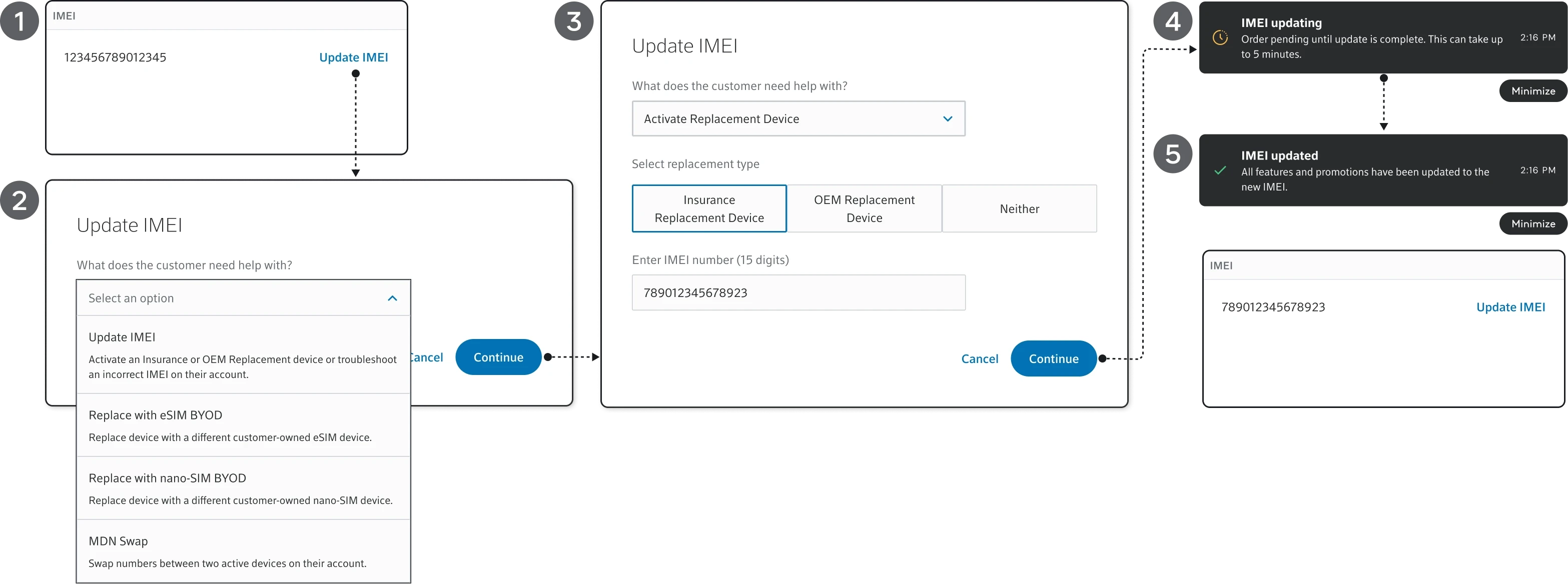
1
Access the Update IMEI action from Device Details
Access the Update IMEI action from Device Details
2
Select the appropriate IMEI update workflow
Select the appropriate IMEI update workflow
3
Confirm the replacement type and IMEI
Confirm the replacement type and IMEI
4
Receive real-time update status notifications
Receive real-time update status notifications
5
View the updated IMEI in the device card
View the updated IMEI in the device card
3
ITERATION - Workflow Refinements
ITERATION - Workflow Refinements
Based on revised requirements and findings from workflow exploration, revisions were implemented to reduce clicks, improve clarity, and enhance overall usability.
Implemented workflow revisions to reduce clicks, improve clarity, and enhance usability.
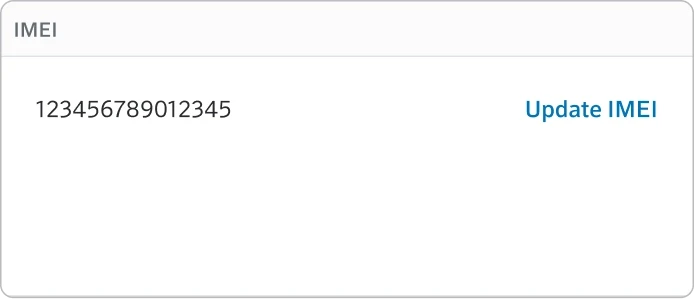
1
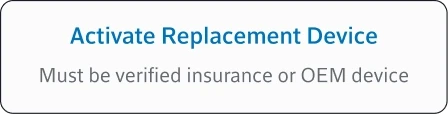
Since Update IMEI is a less frequently used workflow, the CTA was moved to the bottom of the page and renamed Activate Replacement Device for better clarity.
Update IMEI was repositioned and renamed Activate Replacement Device to improve clarity and discoverability.
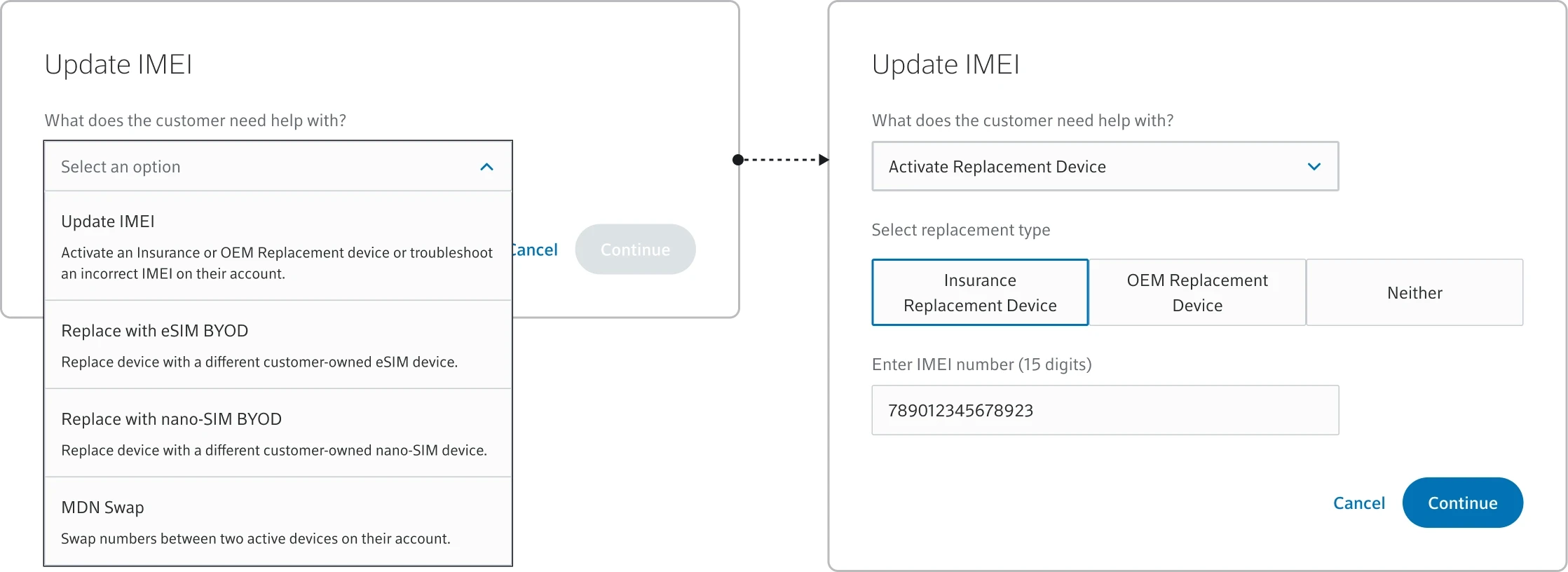
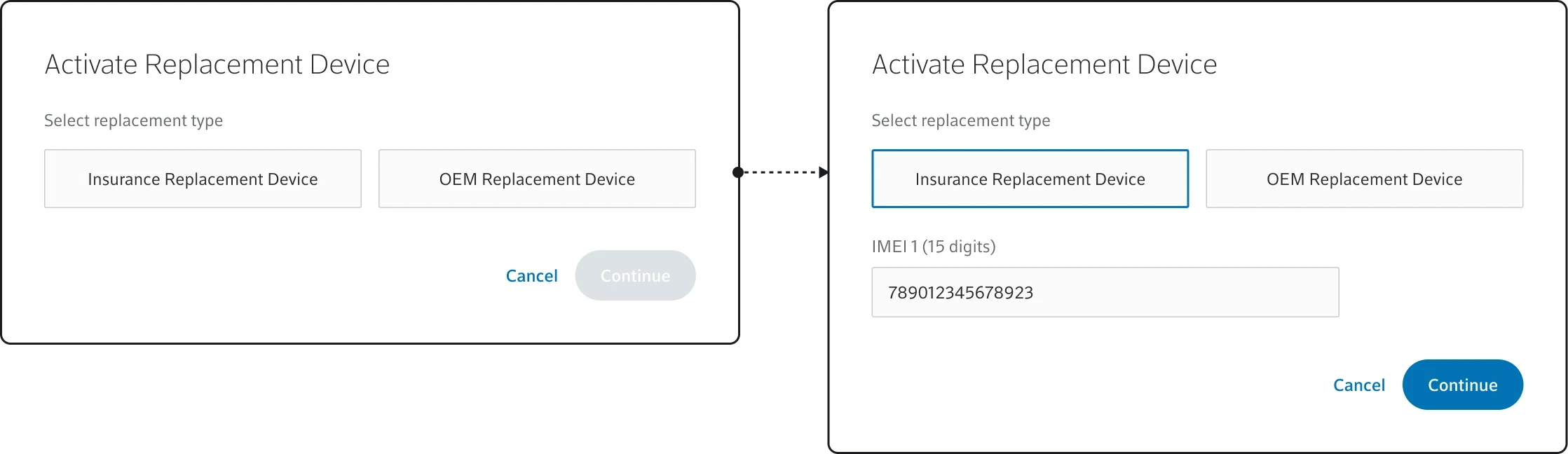
2
Removed the redundant dropdown step by surfacing replacement type selection first and auto-displaying the IMEI field to reduce clicks and streamline the workflow.
Removed a dropdown by surfacing replacement type selection upfront and auto-showing the IMEI field.
4
SOLUTION - Final Workflow Experience
SOLUTION - Final Workflow Experience
After iteration, refined and validated the workflow into high-fidelity screen designs that streamlined the IMEI update process while aligning with business requirements and operational objectives.
Refined and validated the workflow into high-fidelity designs that streamlined the IMEI update process.
1
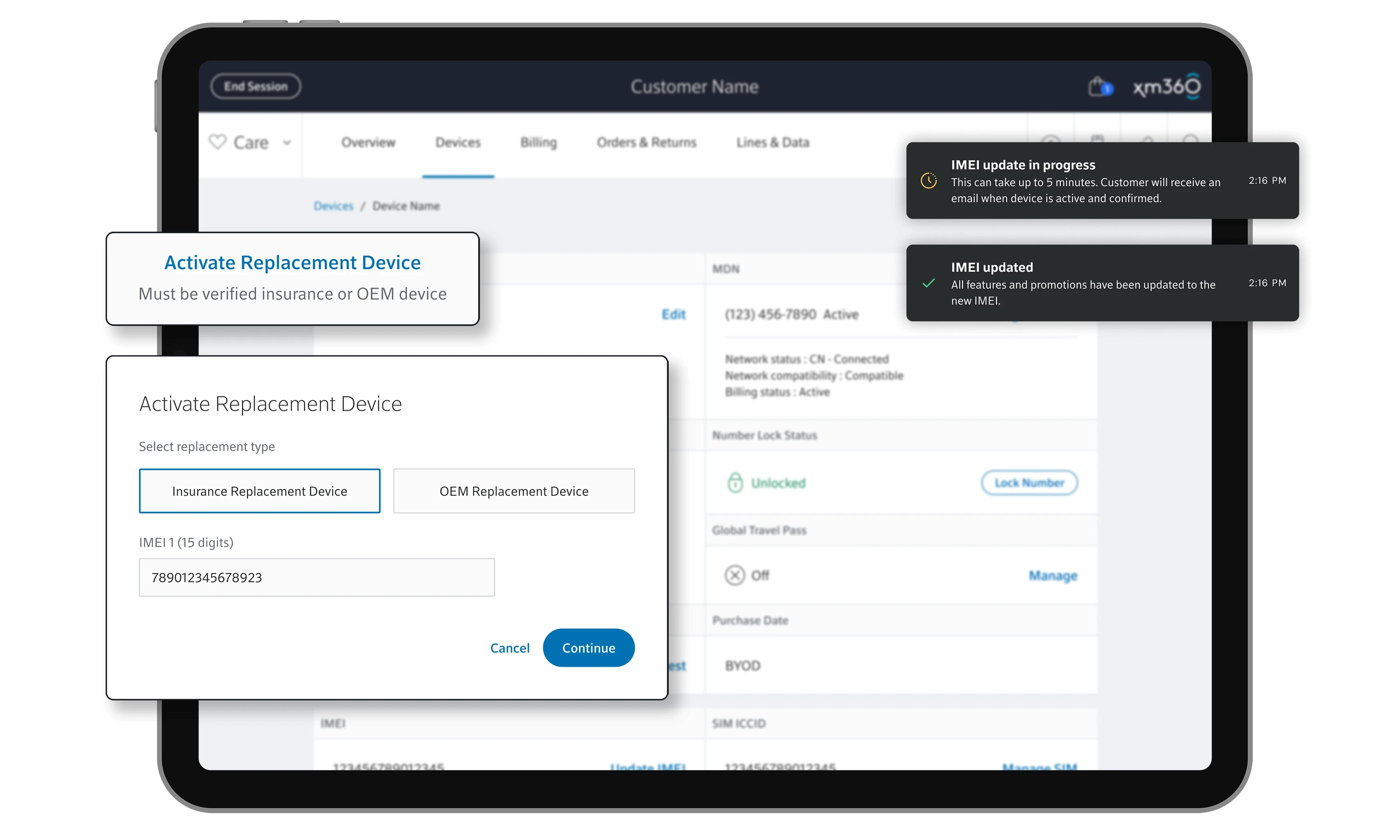
Activate Replacement Device to initiate update IMEI.
Activate Replacement Device to initiate update IMEI.
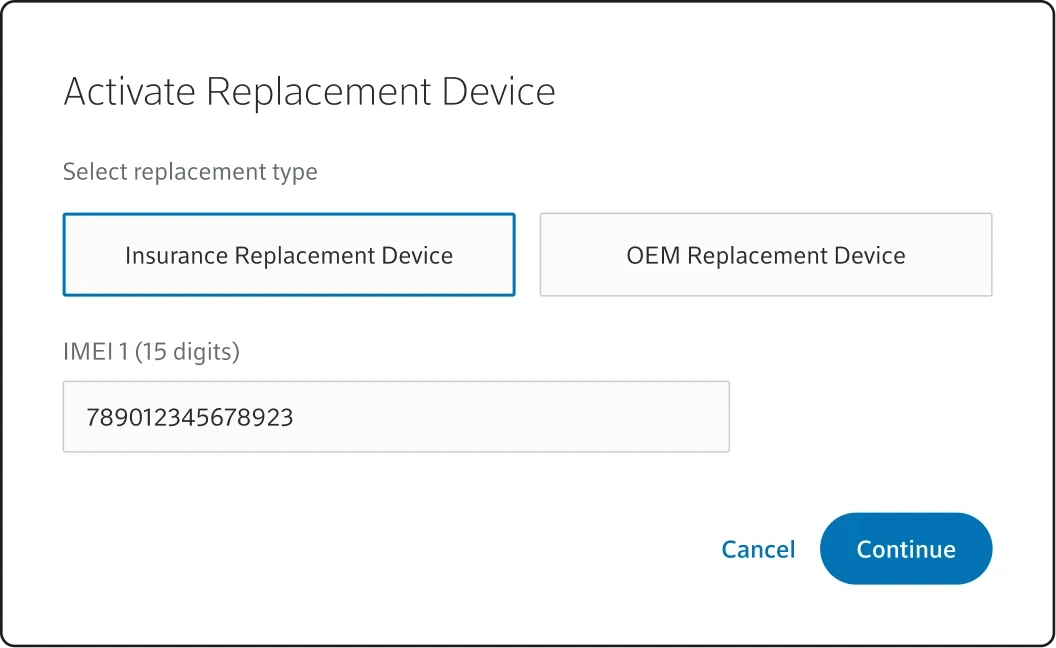
2
Agent selects the replacement type, enters IMEI #
Agent selects the replacement type, enters IMEI #
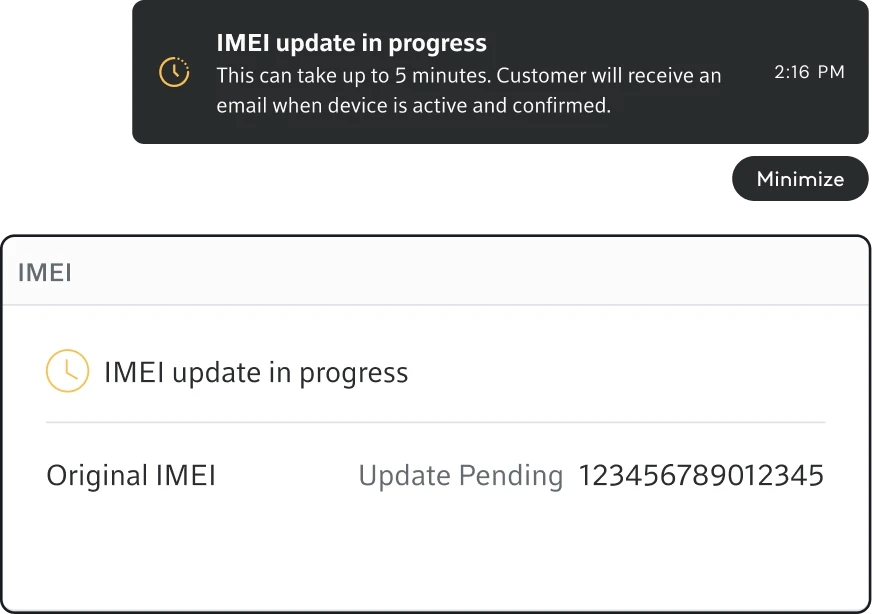
3
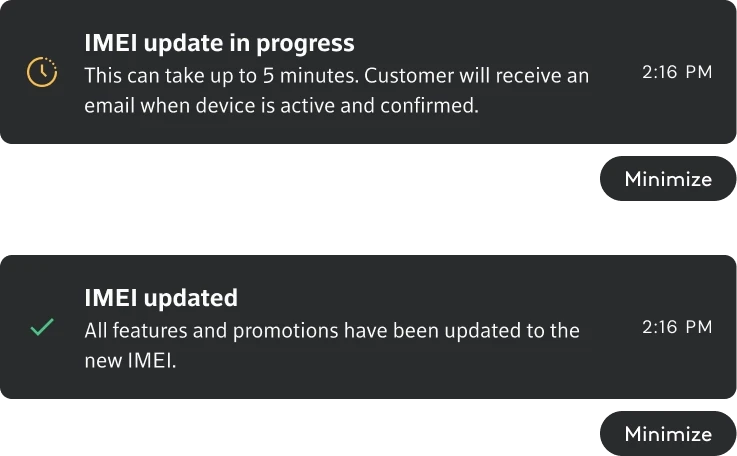
IMEI update in progress state
IMEI update in progress state
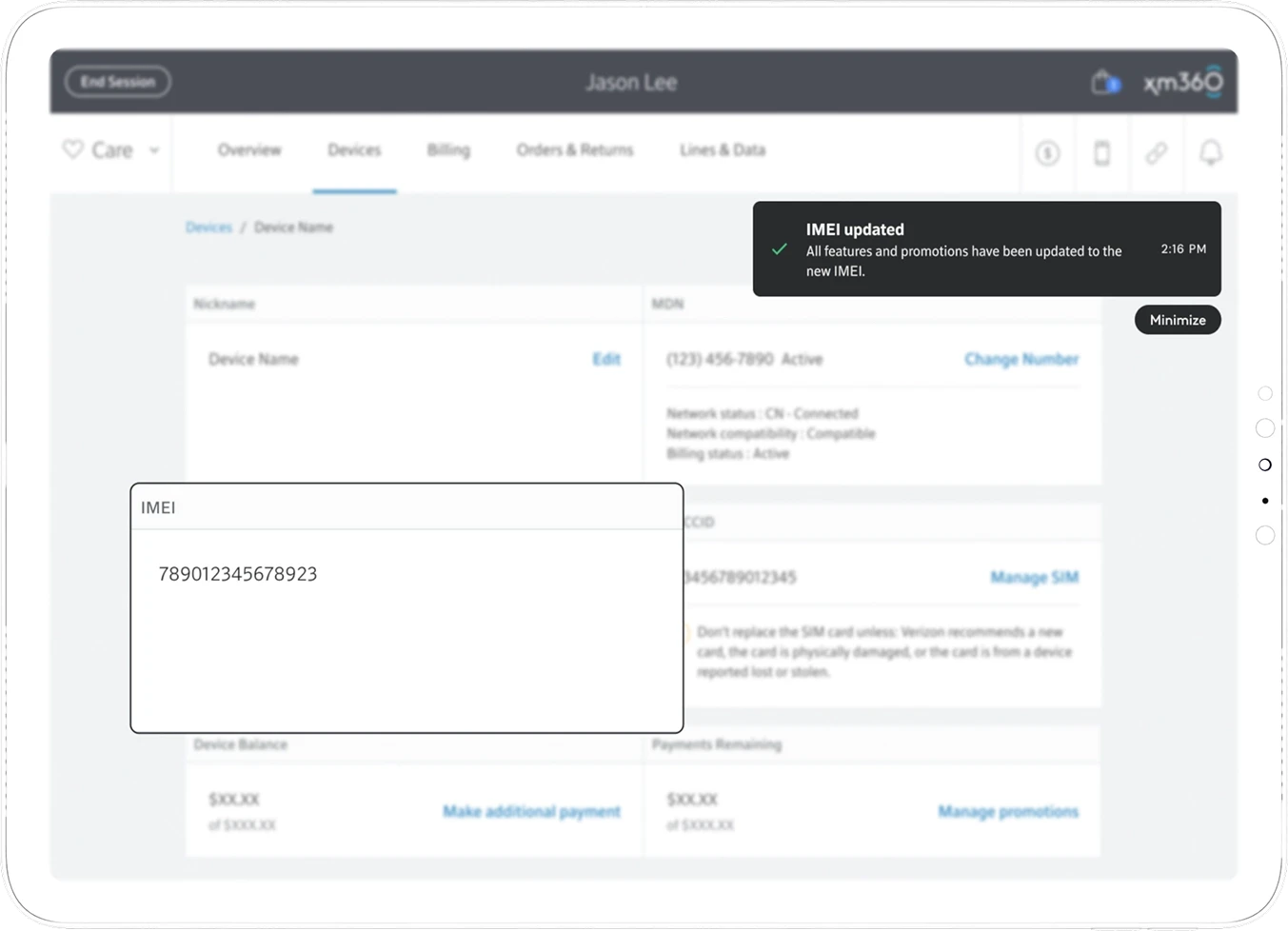
4
IMEI update success state
IMEI update success state
IMEI update success state
2
Updating & Verifying Device IMEI Before Activation
Updating & Verifying Device IMEI Before Activation
Enable agents to validate and update device IMEI information before activation to ensure accurate device activation, protection coverage, and billing alignment.
Enable agents to validate and update IMEIs before activation for accurate activation and billing.
problem
IMEI mismatches can cause incorrect activations and billing errors
IMEI mismatches can cause incorrect activations and billing errors
Invalid device data may impact protection coverage and increase fraud risk
Invalid device data may impact protection coverage and increase fraud risk
Activation issues create additional support and operational rework
Activation issues create additional support and operational rework
Opportunity
Add a gated IMEI verification step before activation
Add a gated IMEI verification step before activation
Enable upfront device validation and eligibility checks
Enable upfront device validation and eligibility checks
Reduce activation errors and improve operational efficiency
Reduce activation errors and improve operational efficiency
SOLUTION
SOLUTION
Redesigned the activation workflow to support upfront IMEI verification and updates before activation, enabling guided IMEI correction, validated device swaps, and real-time status feedback to reduce activation errors and operational friction
Redesigned the activation workflow with upfront IMEI validation, guided updates, and real-time status feedback to reduce errors and friction.
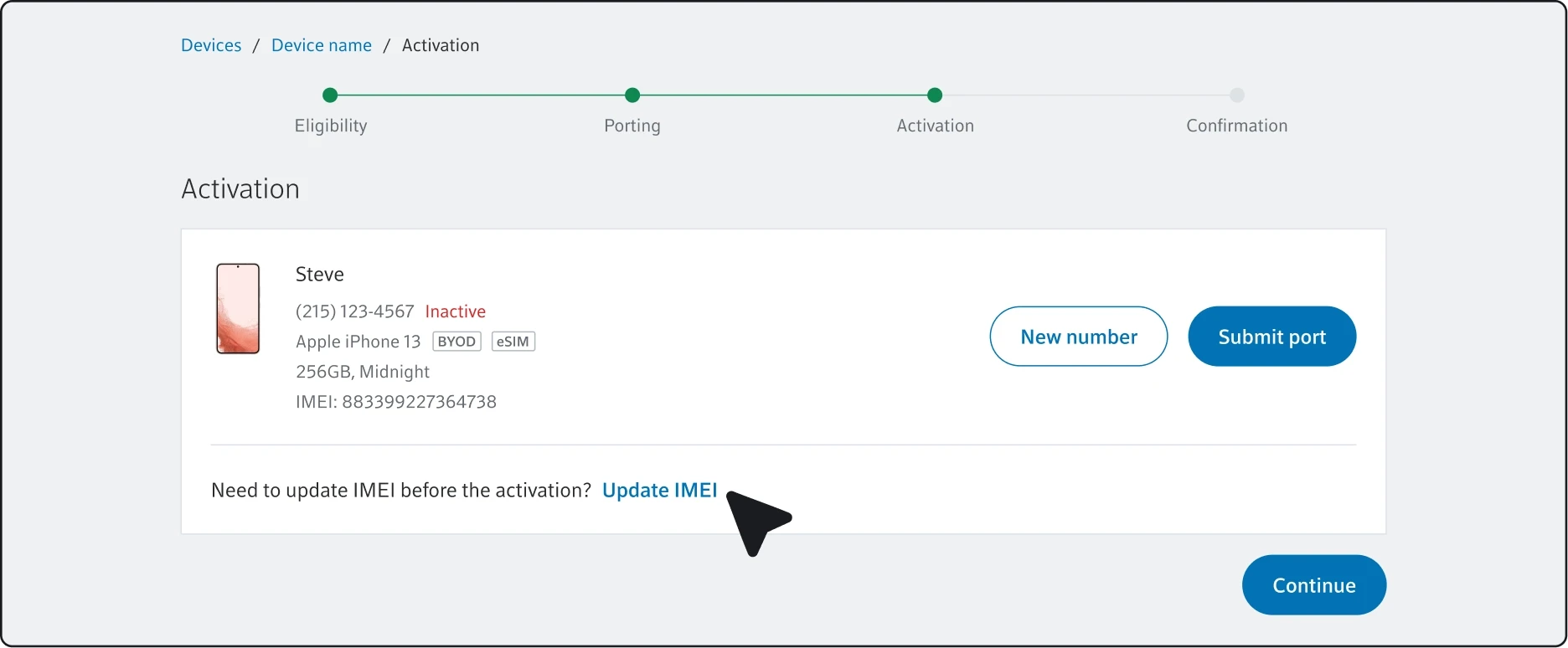
1
Implemented 'Update IMEI' CTA during activation.
Enter IMEI manually
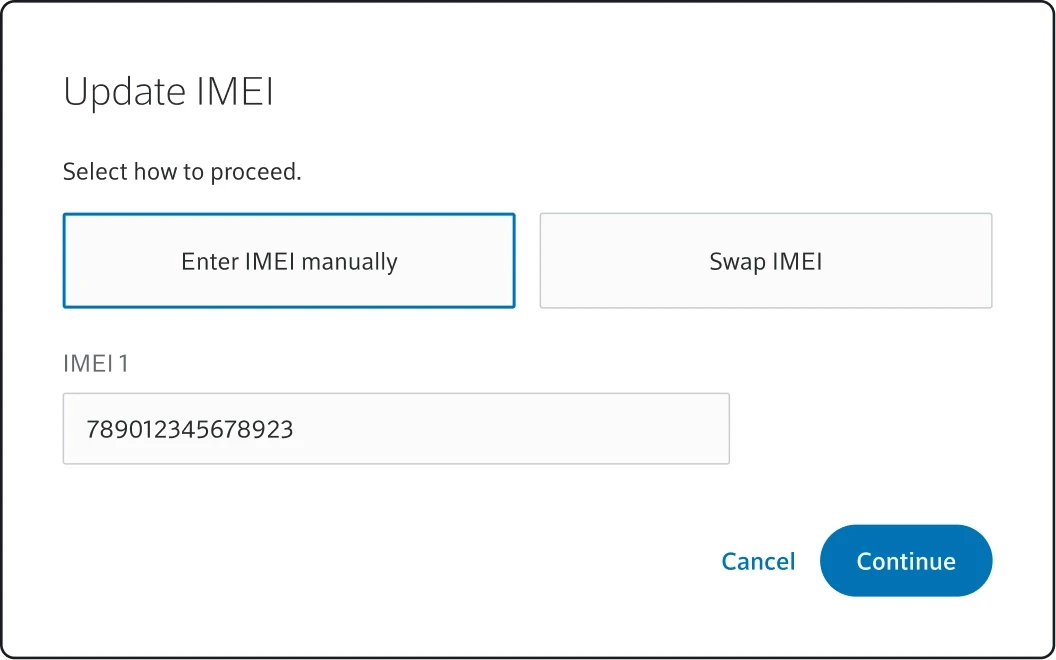
2
Add a new IMEI not currently in the system.
Swap IMEI
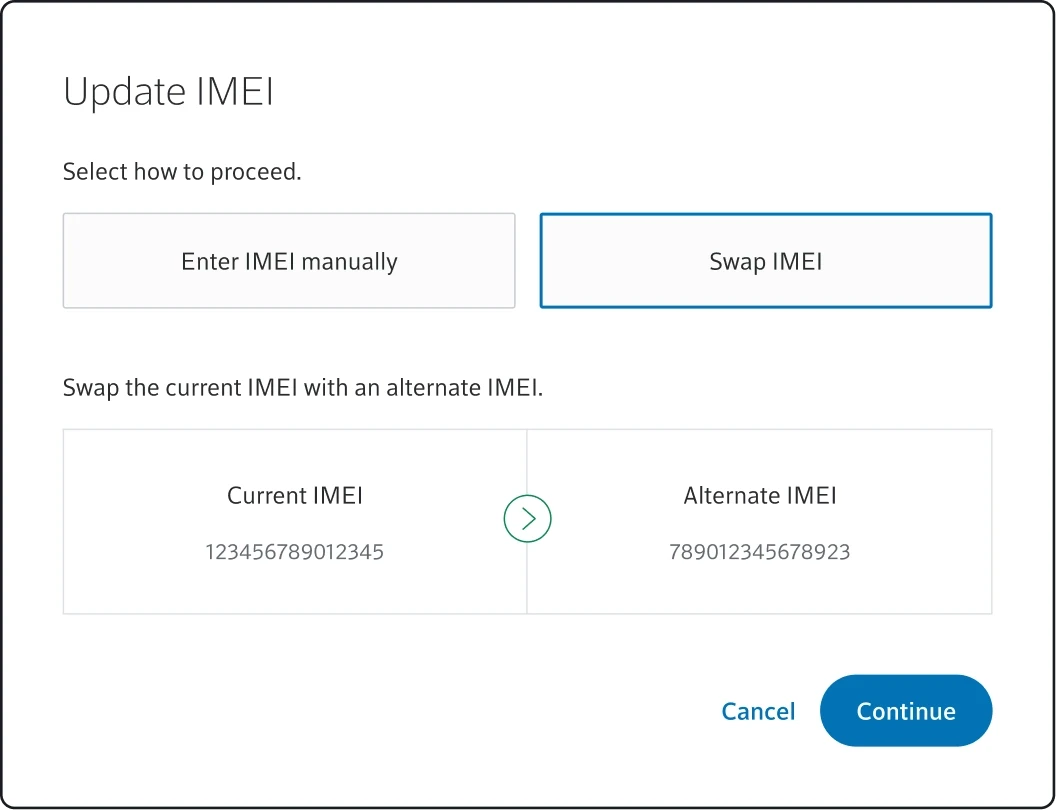
2
Switch to an existing, system-validated IMEI.
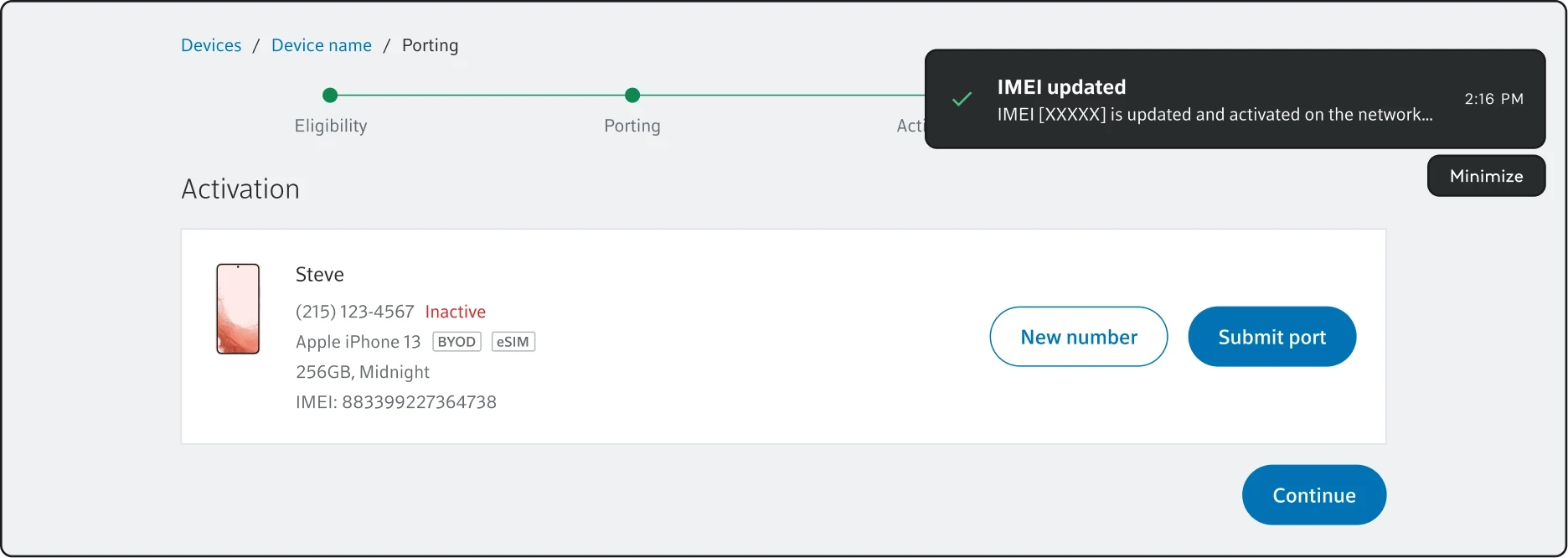
3
IMEI updated successfully.
3
IMEI error handling
IMEI error handling
Enable agents to automatically identify and resolve IMEI activation issues before activation to improve activation accuracy and reduce operational rework.
Enable agents to identify and resolve IMEI activation issues before activation to improve accuracy and reduce rework.
problem
IMEI errors block activation progress
IMEI errors block activation progress
Lack of guidance on alternate IMEI vs escalation
Lack of guidance on alternate IMEI vs escalation
Increased handle time and inconsistent outcomes
Increased handle time and inconsistent outcomes
Opportunity
Automatically identify eligible IMEI errors
Automatically identify eligible IMEI errors
Guide agents to alternate IMEI activation or escalation
Guide agents to alternate IMEI activation or escalation
Reduce friction and improve activation accuracy
Reduce friction and improve activation accuracy
SOLUTION
SOLUTION
Redesigned the porting workflow to detect eligible IMEI errors and guide agents through alternate IMEI updates with real-time status feedback, reducing manual workarounds and escalations.
Redesigned the porting workflow to detect IMEI errors and guide alternate IMEI updates, reducing workarounds and escalations.
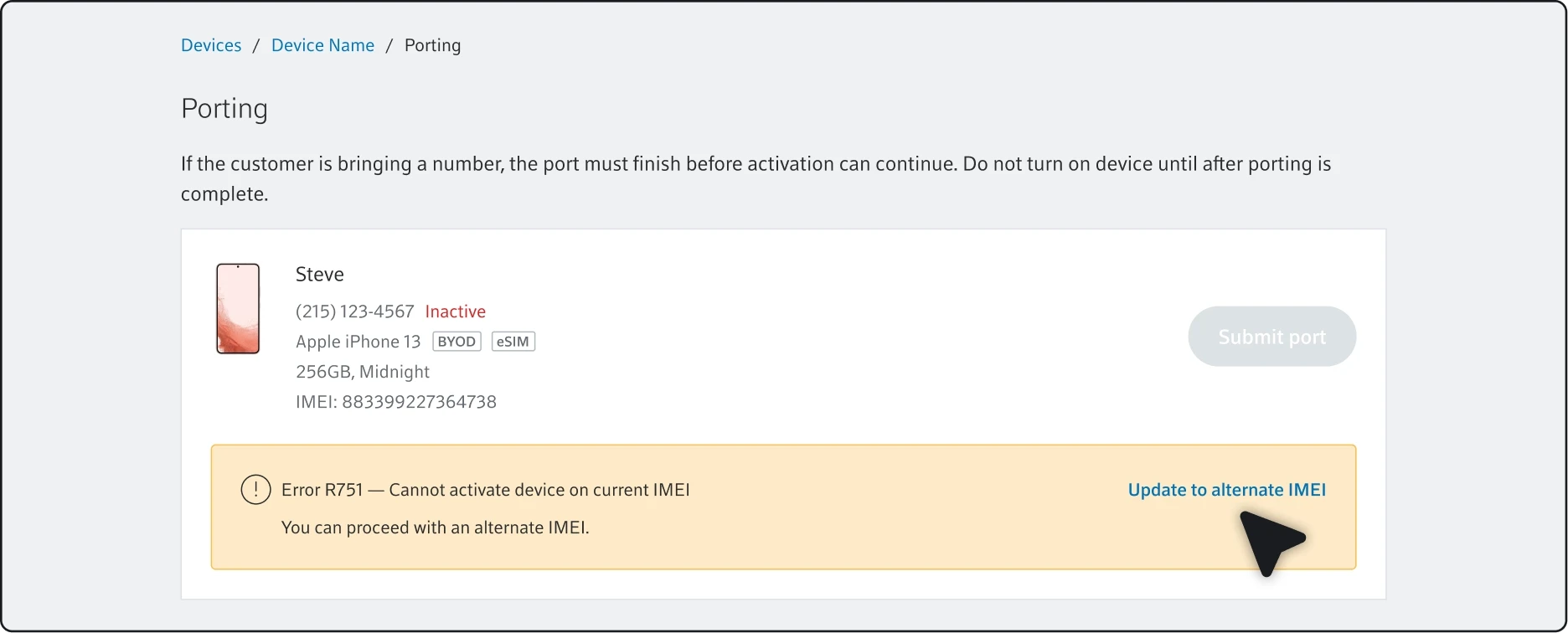
1
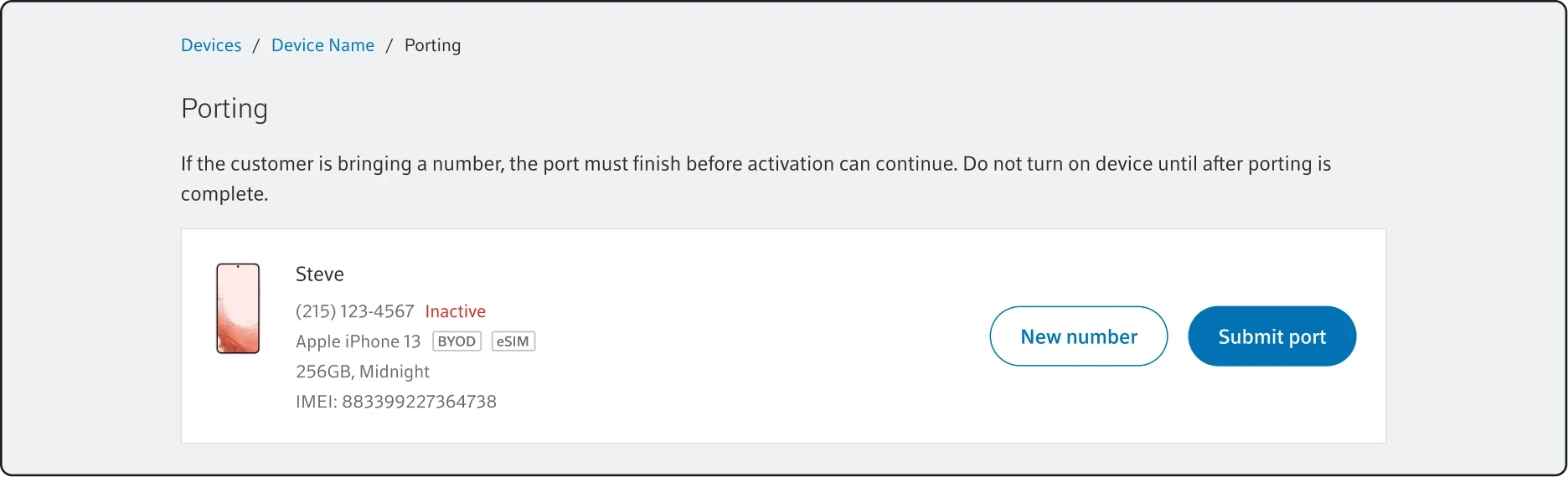
An error occurs during the porting.
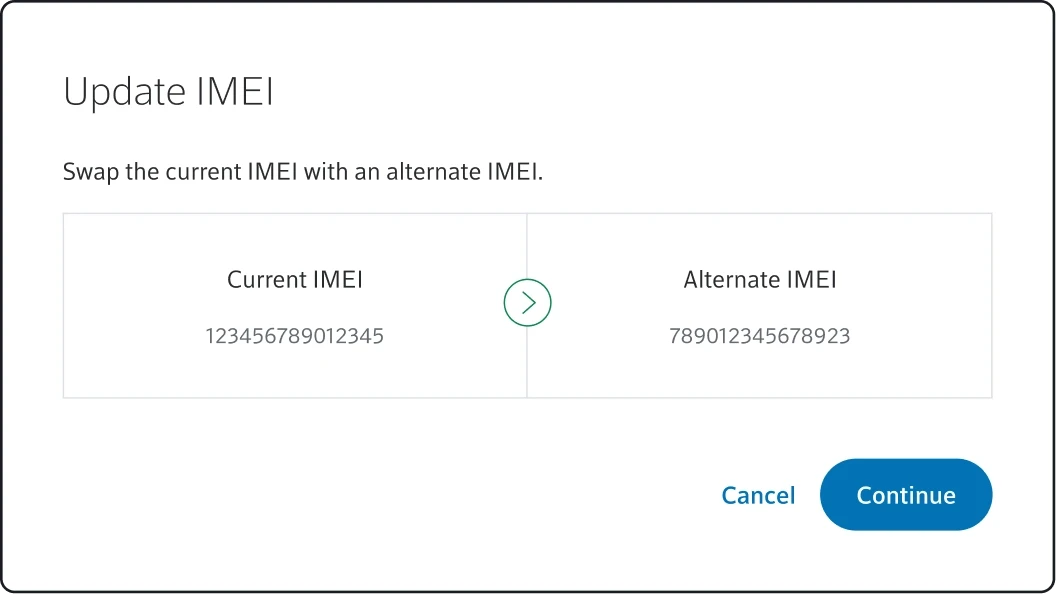
2
Agent swaps the current IMEI with alternate IMEI.
3
System goes through updating progress to completation.
4
Agent can start porting.
Solution Capabilities
Solution Capabilities
because of the update
1
Enable replacement device activation before overnight IMEI data syncs.
2
Support alternate IMEI activation to resolve activation errors faster.
3
Allow agents to update eligible IMEIs directly during activation.
Allow agents to update eligible IMEIs directly during activation.
4
Enable in-platform correction of mismatched IMEI data across systems.
Thank you for watching.
Thank you for watching.
Thank you for watching.