case study
case study
FIG
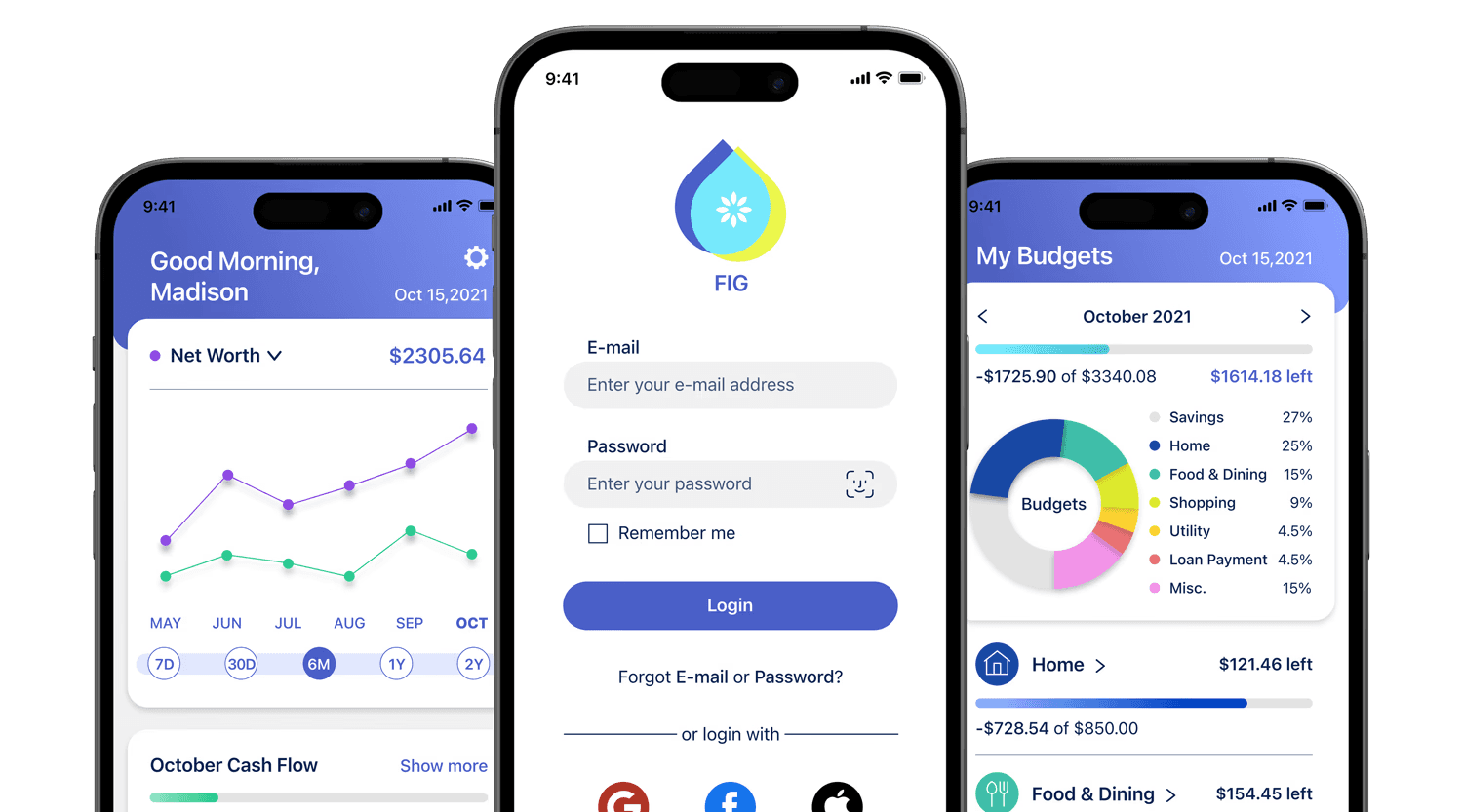
a personal finance app that helps users manage all aspects of their personal finances, including tracking daily expenses, customizing spending budgets
and savings goals, and bill payments.
a personal finance app that helps users manage all aspects of their personal finances, including tracking daily expenses, customizing spending budgets and savings goals, and bill payments.
a personal finance app that lets users track spending, set budgets and savings goals, and pay bills in one place.
Timeline
I Oct 2021 - Feb 2022
Role
I Lead UX designer
Timeline
I Oct 2021 - Feb 2022
Role
I Lead UX designer
Problem Statement
FIG users need an intuitive way to manage daily finances, track budgets and savings goals, and monitor bills to avoid late fees and protect their credit scores. Success will be measured by a projected 20% increase in user savings within three months and a reduction in late payment fees to 3%.
Problem Statement
FIG users need an intuitive way to manage their personal finances. Success is measured by a 20% ↑ in savings within 3 months and a ↓ to 3% in late payment fees.
Competitive Analysis
Competitive Analysis
I conducted a competitive analysis of finance apps to identify market gaps, evaluate existing user experiences, and uncover opportunities to differentiate FIG.
Competitive analysis of leading finance apps to identify market gaps and opportunities for a differentiated FIG UX.
Cash Flow Overview
Cash Flow Overview
Set Budgets
Set Budgets
Set Savings Goal
Set Savings Goal
Make Payments
Make Payments
Intuitive UX/UI
Intuitive UX/UI
Mint
Mint
YNAB
YNAB
NerdWallet
NerdWallet
FIG
FIG
Strength
Secure access w/ multi-factor authentication
Secure access w/ multi-factor authentication
Strong financial visibility through alerts and net worth tracking
Strong financial visibility through alerts and net worth tracking
Seamless account linking & budgeting tools
Seamless account linking & budgeting tools
Weaknesses
Limited feature depth and functionality
Limited feature depth and functionality
Disorganized dashboard and navigation
Disorganized dashboard and navigation
Confusing onboarding with intrusive ads
Confusing onboarding with intrusive ads
Opportunities
Improve transaction visibility and account organization
Improve transaction visibility and account organization
Keep balances and account data consistently updated
Keep balances and account data consistently updated
Centralize bill tracking and payments
Centralize bill tracking and payments
Threats
Competitors offer stronger financial planning tools
Competitors offer stronger financial planning tools
Free alternatives attract users despite ad-heavy experiences
Free alternatives attract users despite ad-heavy experiences
Paid ad-free models may deter cost-sensitive users
Paid ad-free models may deter cost-sensitive users
User Interview
User Interview
Building on market insights, I conducted user interviews to better understand user behaviors, frustrations, needs, and goals within personal finance management.
Conducted user interviews to identify key behaviors, pain points, needs, and goals that shape user expectations for a finance app.
overview
Sessions
Dates
between Oct. 07-09, 2021
Length
approx. 30 Min.
Test Method
moderated Interview
Tool
Zoom
Participants
All sessions were recorded based on the participant’s consent.
3 demographic questions
12 targeted questions
Amelia
F / 25
Customer Support Rep
San Jose, CA
Evans
M / 26
Business Analyst
Napa, CA
Karla
F / 31
Food Supply Manager
Berlin, Germany
Interview Analysis
BEHAVIORS & ATTITUDES
I use a banking app. It lets me see the overview of the recent transactions and payments. It is quick and simple. — Karla
I use a banking app. It lets me see the overview of the recent transactions and payments. It is quick and simple. — Karla
I use my mobile app to check my checking balance everyday. — Amelia
I use my mobile app to check my checking balance everyday. — Amelia
I feel safe using money apps because they have two factor authentication enabled. — Evans
I feel safe using money apps because they have two factor authentication enabled. — Evans
NEEDS & GOALS
I want a finance app with features for bill payment, financial overviews, budget setting, and expense tracking. — Amelia
I want a finance app with features for bill payment, financial overviews, budget setting, and expense tracking. — Amelia
I need a quick and easy way to check my finance daily. — Evans
I need a quick and easy way to check my finance daily. — Evans
I want to create budget for my monthly expense. — Karla
I want to create budget for my monthly expense. — Karla
FRUSTRATIONS
I often forget to pay my bills on time. — Karla
I often forget to pay my bills on time. — Karla
Sometimes I set a savings goal but forget to contribute to it. — Amelia
Sometimes I set a savings goal but forget to contribute to it. — Amelia
I’m concern for the security issue with finance app. — Evans
I’m concern for the security issue with finance app. — Evans
Key Takeaways
What do users value most in personal finance apps?
What do users value most in personal finance apps?
Clear financial visibility
Clear financial visibility
Fast and intuitive workflows
Fast and intuitive workflows
Budgeting and goal management
Budgeting and goal management
Seamless bill payment experience
Seamless bill payment experience
Design Personas
Design Personas
Based on research insights, I created personas for Madison and Benjamin to represent key user behaviors, challenges, and goals, helping prioritize functionality and guide product decisions from the user’s perspective.
Design personas capturing core behaviors, challenges, and goals to inform prioritization and keep design decisions user-driven.
“an impulsive spender”

Madison
22 / Single
Junior Graphic Designer
Annual Salary: $45K
Brooklyn, NY
Behaviors
Frequently makes impulse purchases
Fast and intuitive workflows
Regularly spends on social activities
Challenges
Struggles to consistently save money
Limited budgeting habits and financial planning
High living expenses make saving difficult
Needs / Goals
Set and manage spending budgets
Receive reminders before reaching budget limits
Create customizable budget categories for better spending control
“an impulsive spender”
Madison
22 / Single
Junior Graphic Designer
Annual Salary: $45K
Brooklyn, NY
Behaviors
Frequently makes impulse purchases
Fast and intuitive workflows
Regularly spends on social activities
Challenges
Struggles to consistently save money
Limited budgeting habits and financial planning
High living expenses make saving difficult
Needs / Goals
Set and manage spending budgets
Receive reminders before reaching budget limits
Create customizable budget categories for better spending control
“an ambitious goal setter”

Benjamin
35 / Single Dad
Physical Therapist
Annual Salary: $92K
Columbus, OH
Behaviors
Often lacks enough funds for planned activities
Often lacks enough funds for planned activities
Struggles to balance spending and savings
Struggles to balance spending and savings
Wants to spend more quality time with family
Wants to spend more quality time with family
Challenges
Frequently spends impulsively
Frequently spends impulsively
Limited savings for long-term goals
Limited savings for long-term goals
Feels financially insecure about the future
Feels financially insecure about the future
Needs / Goals
Save for family experiences and future goals
Save for family experiences and future goals
Set up recurring deposits for automated savings
Set up recurring deposits for automated savings
Easily adjust and manage savings goals
Easily adjust and manage savings goals
Task Analysis & User Flows
Task Analysis & User Flows
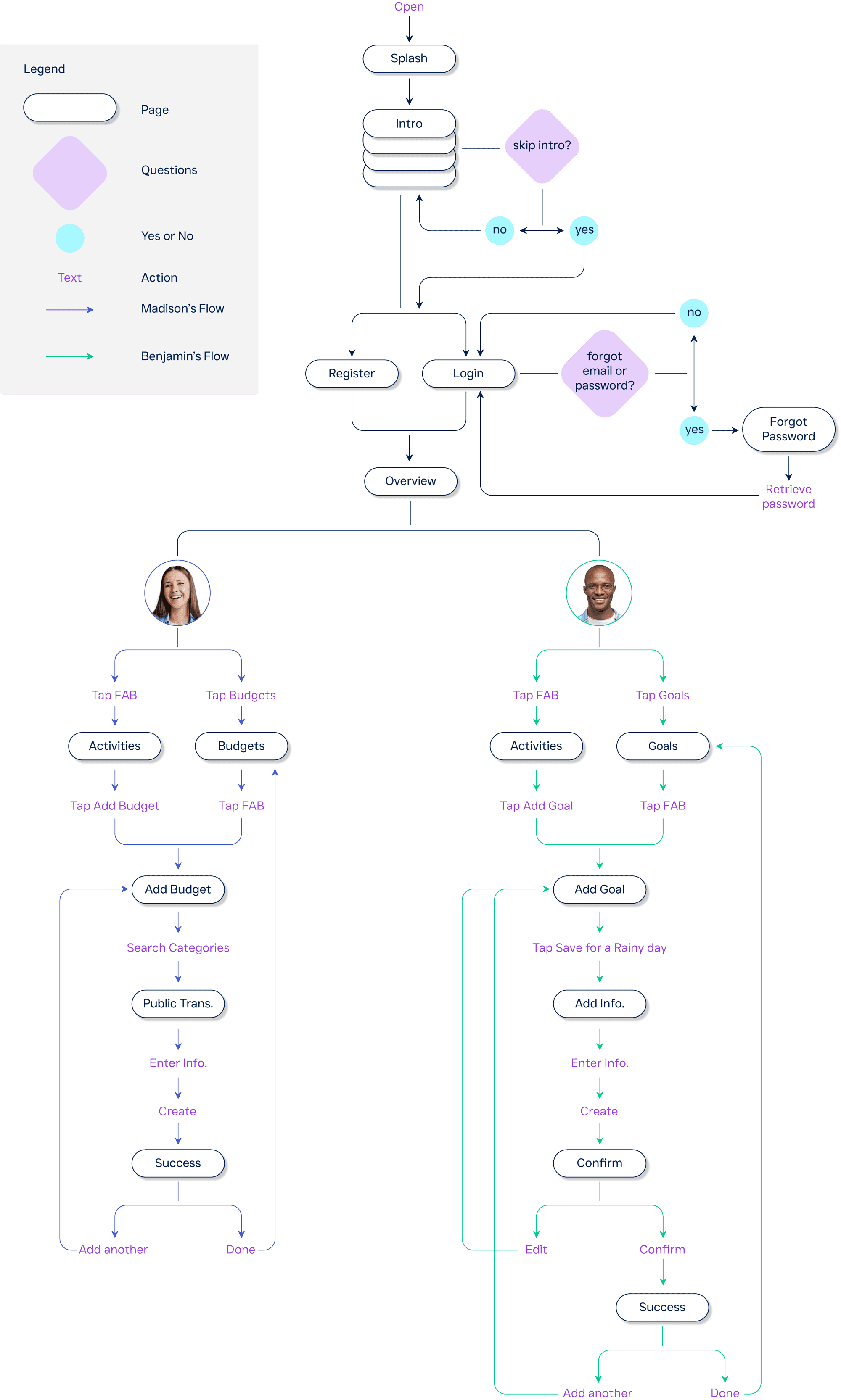
User flows for Madison and Benjamin mapped the step-by-step paths needed to complete key tasks, helping define core actions, required pages, and the overall app structure.
User flows for Madison and Benjamin outline end-to-end tasks, helping define required pages, actions, and overall app structure.
Madison’s Objective
As an impulsive spender,
I want set transportation budgets
so I can save money more consistently each month.
As an impulsive spender,
I want set transportation budgets
so I can save money more consistently each month.
Benjamin’s Objective
As an ambitious goal setter,
I want to set savings goals for emergencies
so I can be more financially secure and financially independent.
As an ambitious goal setter,
I want to set savings goals for emergencies
so I can be more financially secure and financially independent.
Open Card Sorting
Open Card Sorting
Following user interviews, I conducted an open card sorting exercise to help define FIG’s information architecture, better understand users’ mental models, and create more intuitive user flows and content organization.
Open card sorting to shape FIG’s information architecture, revealing user mental models and informing intuitive flows and organization.
overview
Sessions
Dates
Oct. 18, 2021
Length
avg. 8 min per participant
Test Method
digital open card sort session
Participants
5 participants
5 participants
Tool
optimalworkshop.com
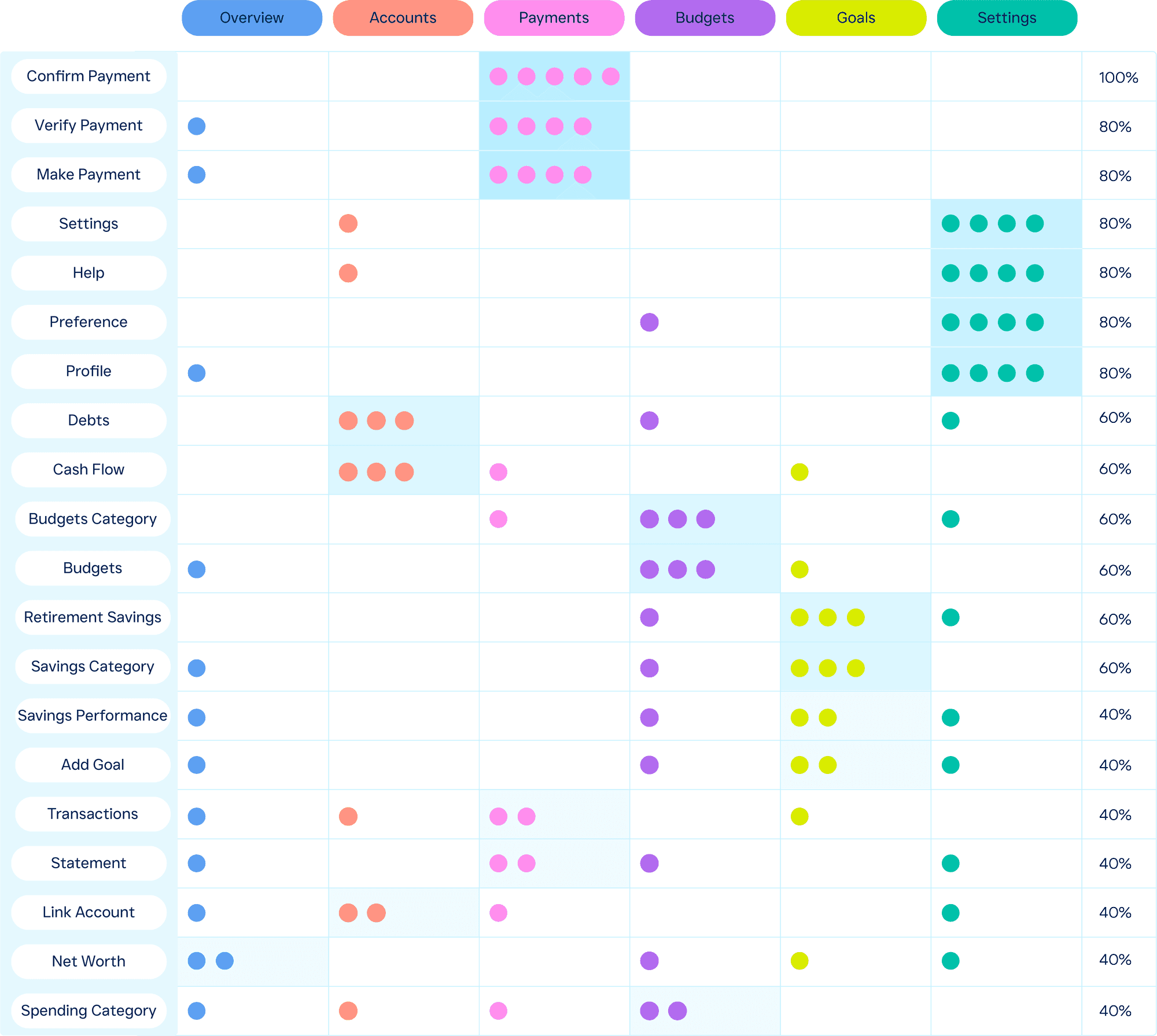
Conducted an open card sort with 5 participants using 20 content topics
Participants grouped topics based on their own mental models
Findings were analyzed and consolidated into the final information architecture
The chart below illustrates how topics were organized into the final structure
Information Architecture
Information Architecture
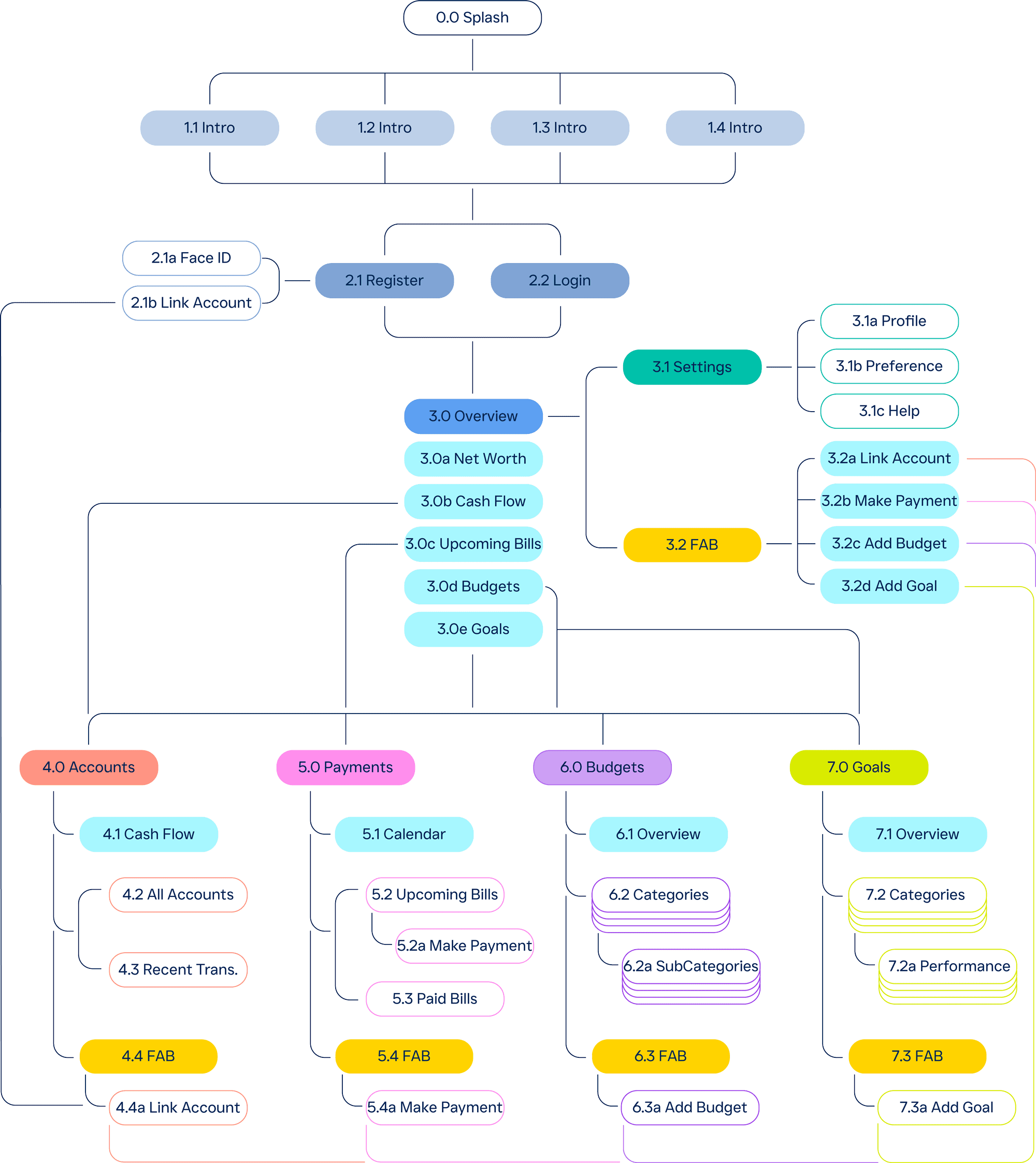
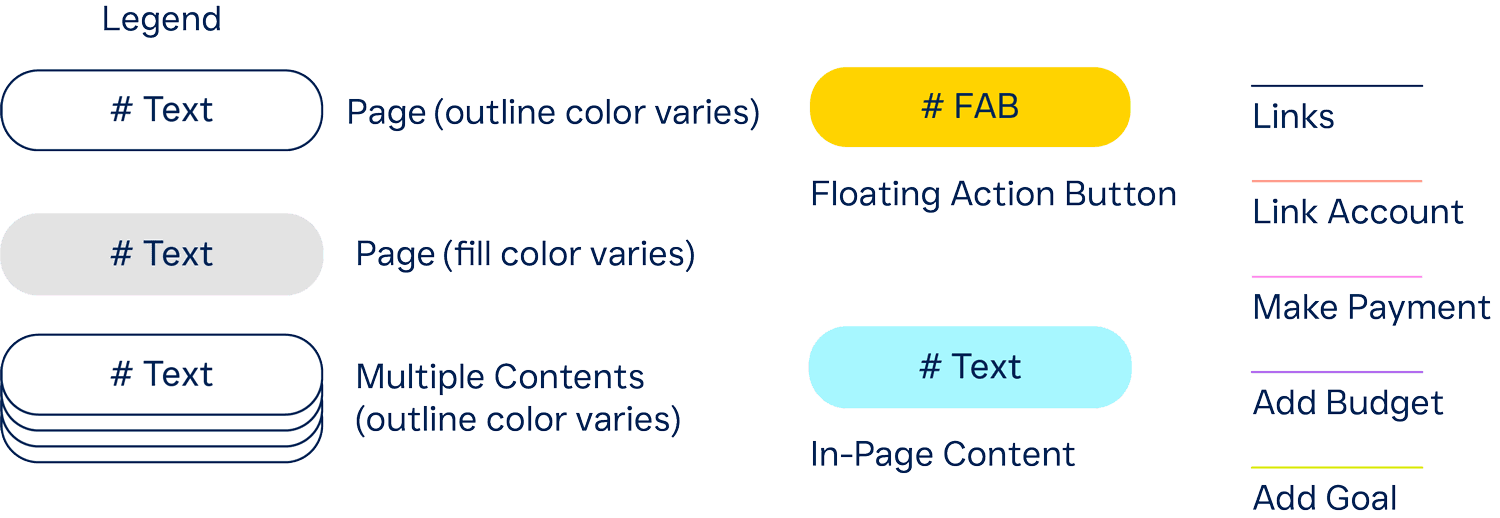
After the open card sorting exercise, I designed the app’s information architecture and simplified the site map to reduce user clicks and improve navigation efficiency.
I designed the app’s information architecture, simplifying the sitemap to reduce clicks and improve navigation.
Low to Mid Fidelity Prototype
Low to Mid Fidelity Prototype
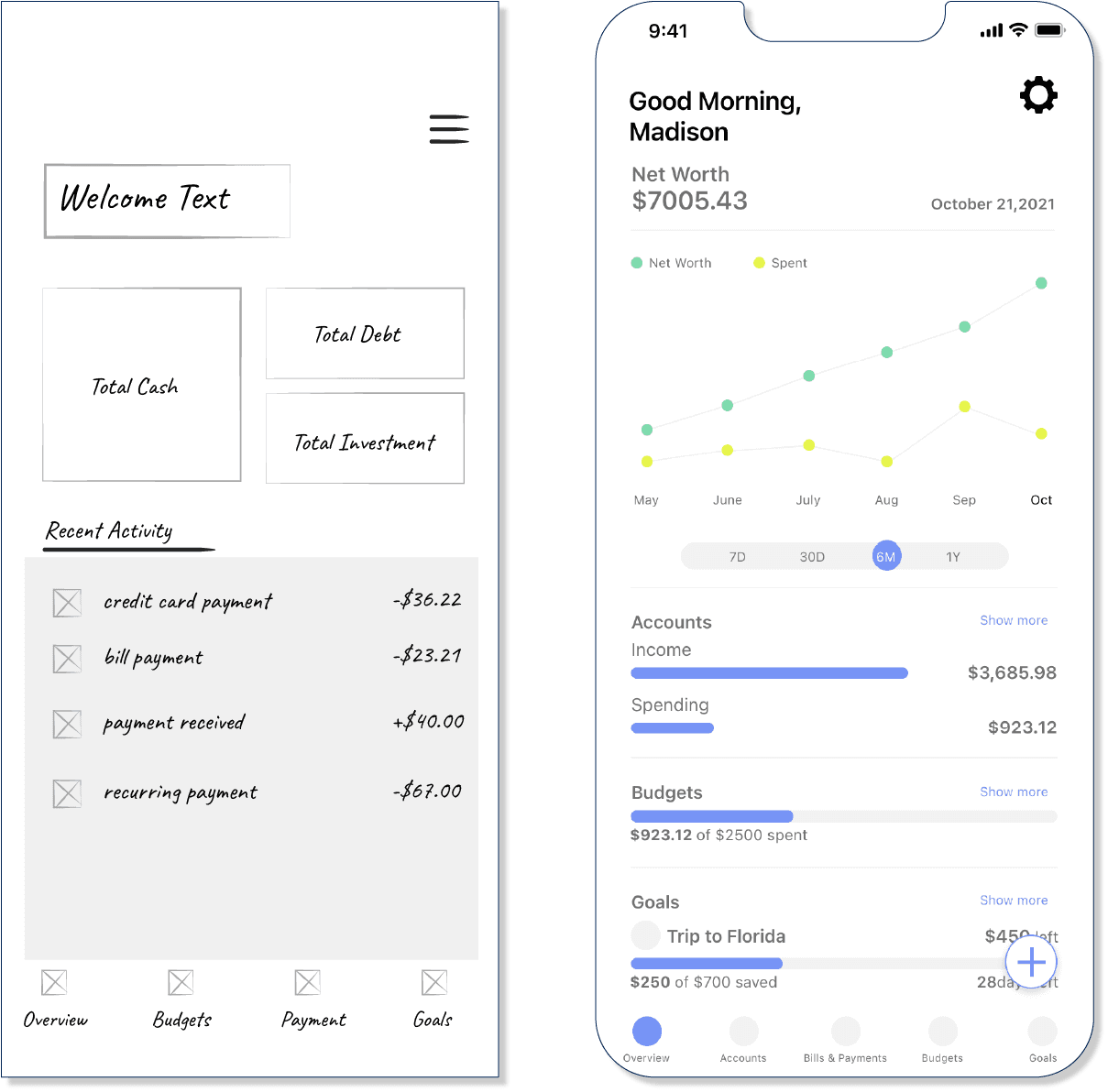
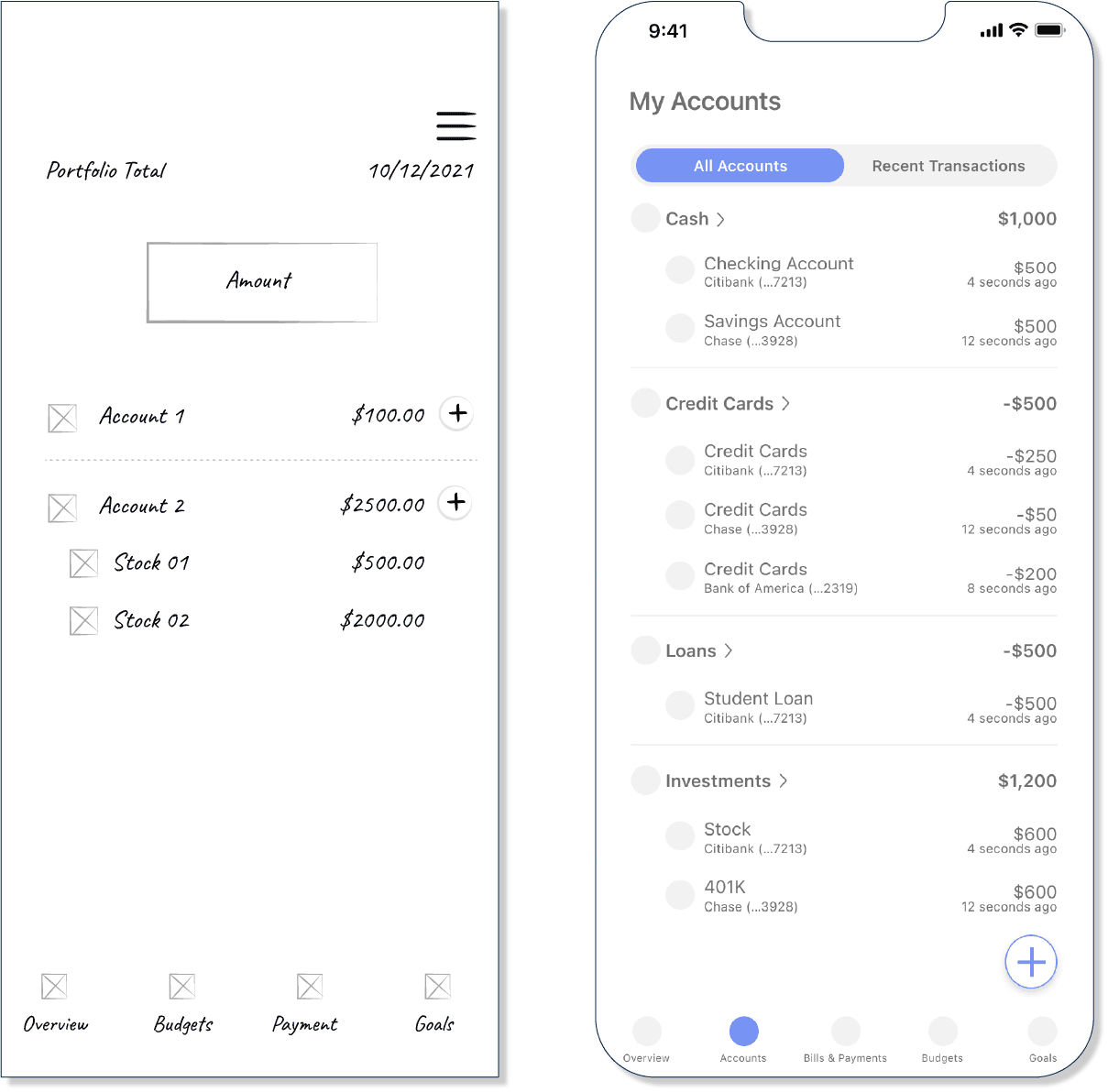
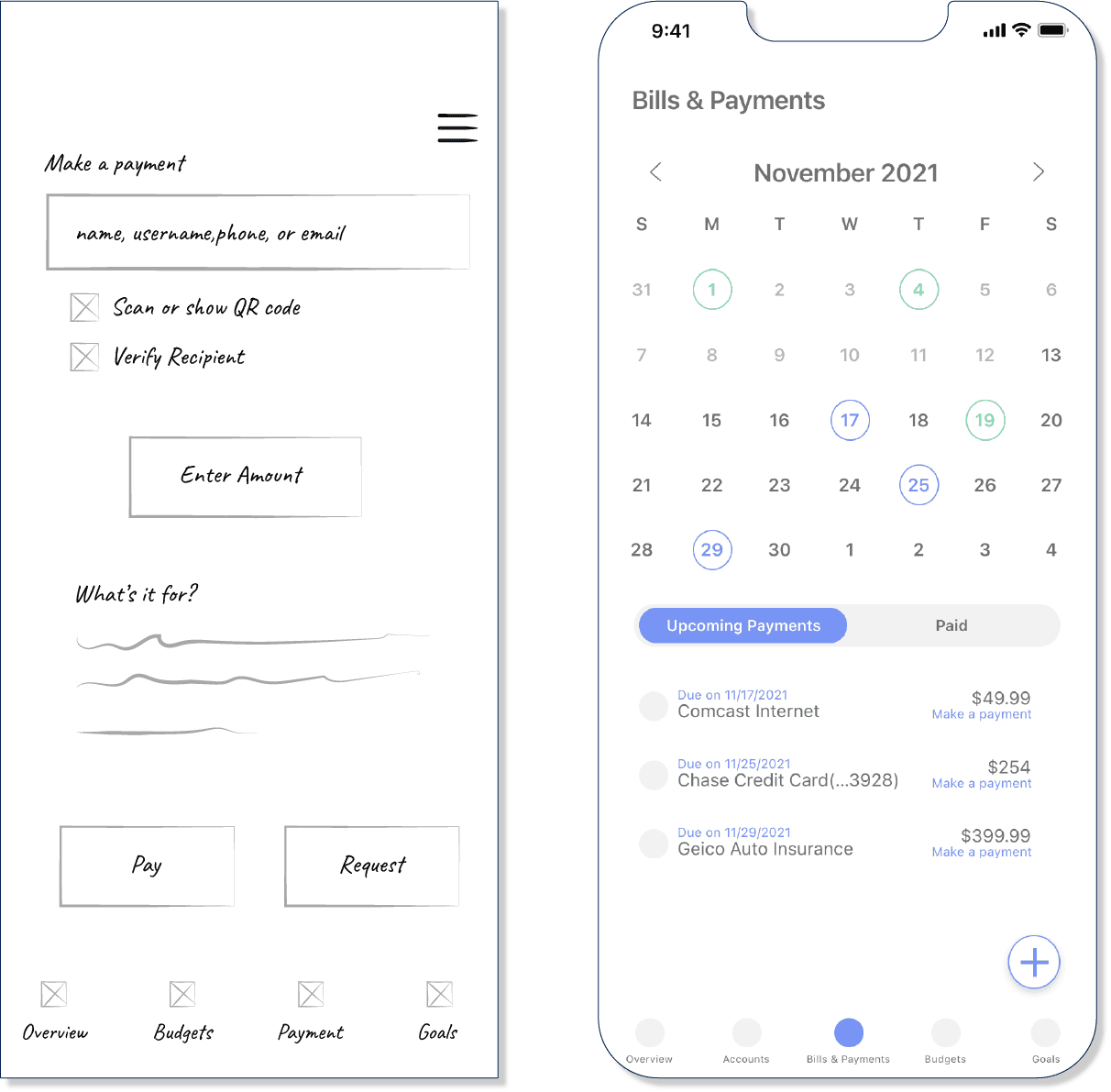
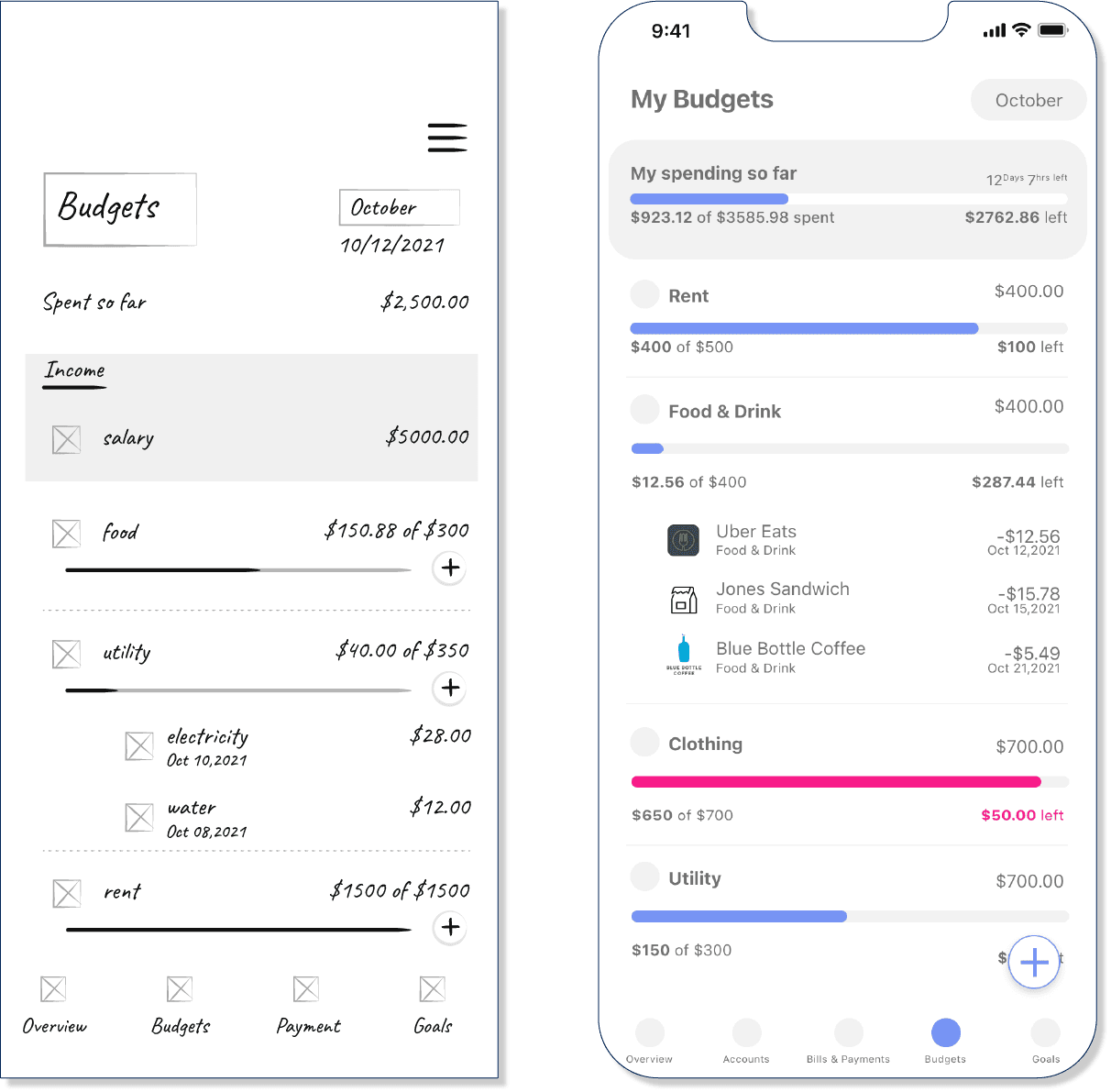
Based on research, I created a low-fidelity prototype to define key functionalities, followed by a mid-fidelity clickable prototype to refine user flows and interactions.
I designed a low-fidelity prototype to outline functionality, then refined it through a mid-fidelity, interactive prototype.
Overview
Accounts
Payments
Budgets
Usability Testing
Usability Testing
I conducted usability testing with six participants using the mid-fidelity prototype to identify usability issues, validate strengths and weaknesses, and gather feedback to further refine the experience.
Tested the mid-fidelity prototype with six users to evaluate usability, identify gaps, and inform design improvements.
overview
Sessions
Dates
between Nov. 15-18, 2021
Length
approx. 15-45 Min.
Test Method
moderated remote
Tool
Zoom
Participants
All sessions were recorded based on the participant’s consent.
4 demographic & 4 targeted questions
Conducted 3 task scenarios
Andrew
M / 26 / Single
M / 26 / Single
Real Estate Paralegal
Real Estate Paralegal
Brooklyn, New York
Brooklyn, New York
Leah
F / 23 / Single
F / 23 / Single
Law Graduate
Law Graduate
Memphis, Tennessee
Memphis, Tennessee
Brody
M / 36 / Married
M / 36 / Married
Product Manager
Product Manager
Berlin, Germany
Berlin, Germany
Olivia
F / 28 / Married
Psychology Counselor
Copenhagen, Denmark
Peter
M / 32 / Single
Graphic Designer
Denver, Colorado
Christine
F / 32 / Married
French Translator
Cincinnati, Ohio
result
problem
Users couldn’t make payments directly from the dashboard
Users couldn’t make payments directly from the dashboard
“Make a Payment” CTA lacked visibility
“Make a Payment” CTA lacked visibility
Goal setup felt overly restrictive due to time limitations
Goal setup felt overly restrictive due to time limitations
Final payment steps were confusing
Final payment steps were confusing
Dashboard account indicators lacked clarity
Dashboard account indicators lacked clarity
Budget and account timeframes were unclear
Budget and account timeframes were unclear
Bill and payment color indicators were difficult to understand
Bill and payment color indicators were difficult to understand
recommendation
Add a prominent “Make a Payment” action on the dashboard
Add a prominent “Make a Payment” action on the dashboard
Improve CTA visibility and readability
Improve CTA visibility and readability
Allow flexible goal timelines for greater user control
Allow flexible goal timelines for greater user control
Simplify payment flows with clearer confirmation steps
Simplify payment flows with clearer confirmation steps
Improve dashboard indicator clarity and labeling
Improve dashboard indicator clarity and labeling
Clearly define budget and account timeframes
Clearly define budget and account timeframes
Use clearer status colors for bills and payments
Use clearer status colors for bills and payments
major
minor
Preference Testing
Preference Testing
After usability testing, I conducted preference testing to understand my target market’s mental model and incorporated their feedback into the high-fidelity prototype.
Conducted preference testing to validate user mental models and incorporated feedback into the high-fidelity prototype.
overview
Sessions
Dates
Nov. 30, 2021
Length
approx. 45 Min.
Test Method
live Internet session
Participants
26 participants age from 18-40
26 participants age from 18-40
Tool
usabilityhub.com
result
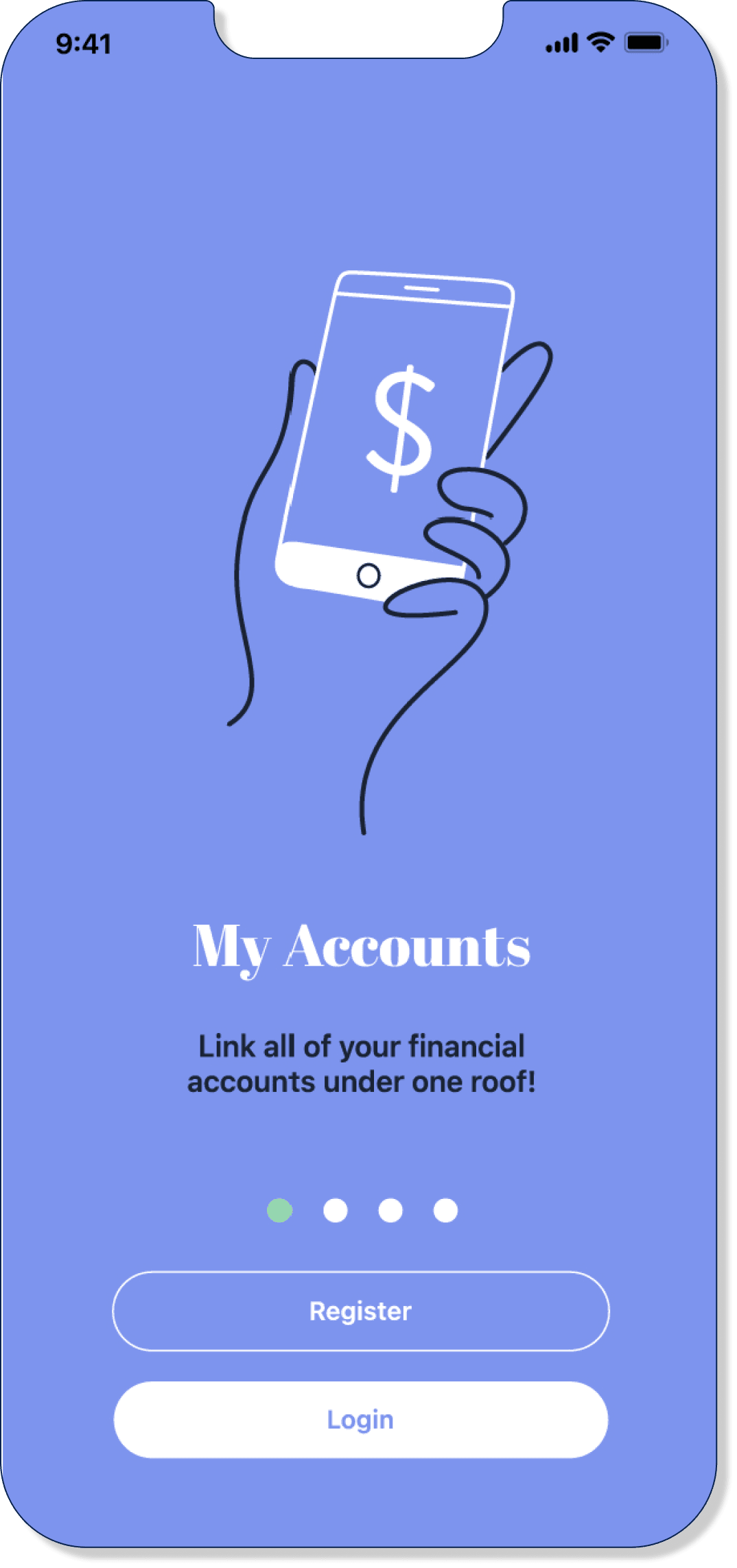
Onboarding Page
This is an intro page for the finance app. Which one do you prefer?
This is an intro page for the finance app. Which one do you prefer?
A
38%
10 out of 26
A feels unbalanced compared to B.
A feels unbalanced compared to B.
I like the cleanness and the sharpness of the design.
I like the cleanness and the sharpness of the design.
Background color feels jarring.
Background color feels jarring.
B
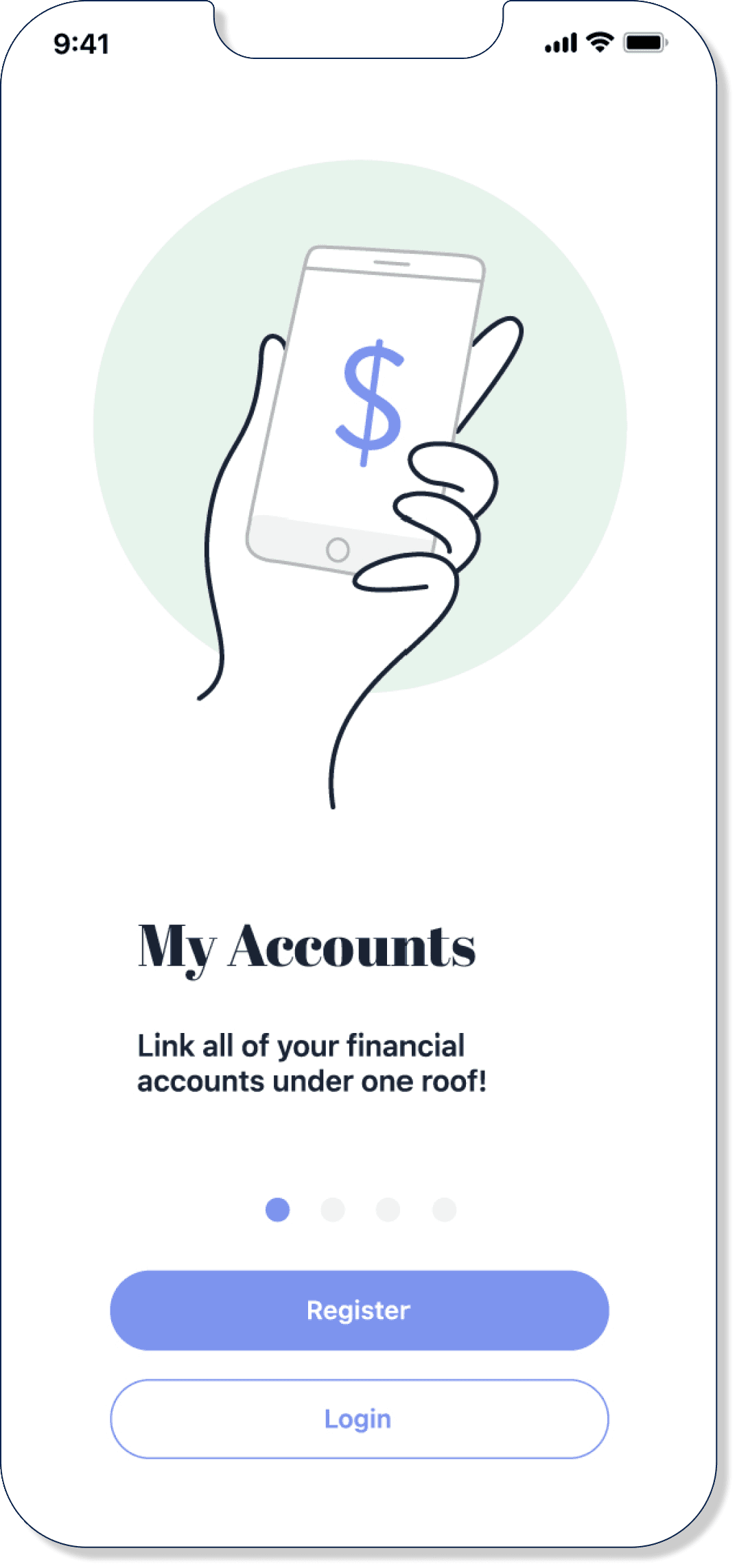
62%
16 out of 26
B is easier to read and it delivers the point more clearly.
B is easier to read and it delivers the point more clearly.
B draws user’s attention more.
B draws user’s attention more.
B is cleaner and visually more balanced.
B is cleaner and visually more balanced.
I tested different introduction page concepts to identify which experience users preferred, with the goal of creating a more engaging and visually impactful onboarding experience.
Tested introduction page variations to identify entry points that keep users engaged and reduce early drop-off.
Account Page
This is an account page for the finance app. Which one do you prefer?
This is an account page for the finance app. Which one do you prefer?
A
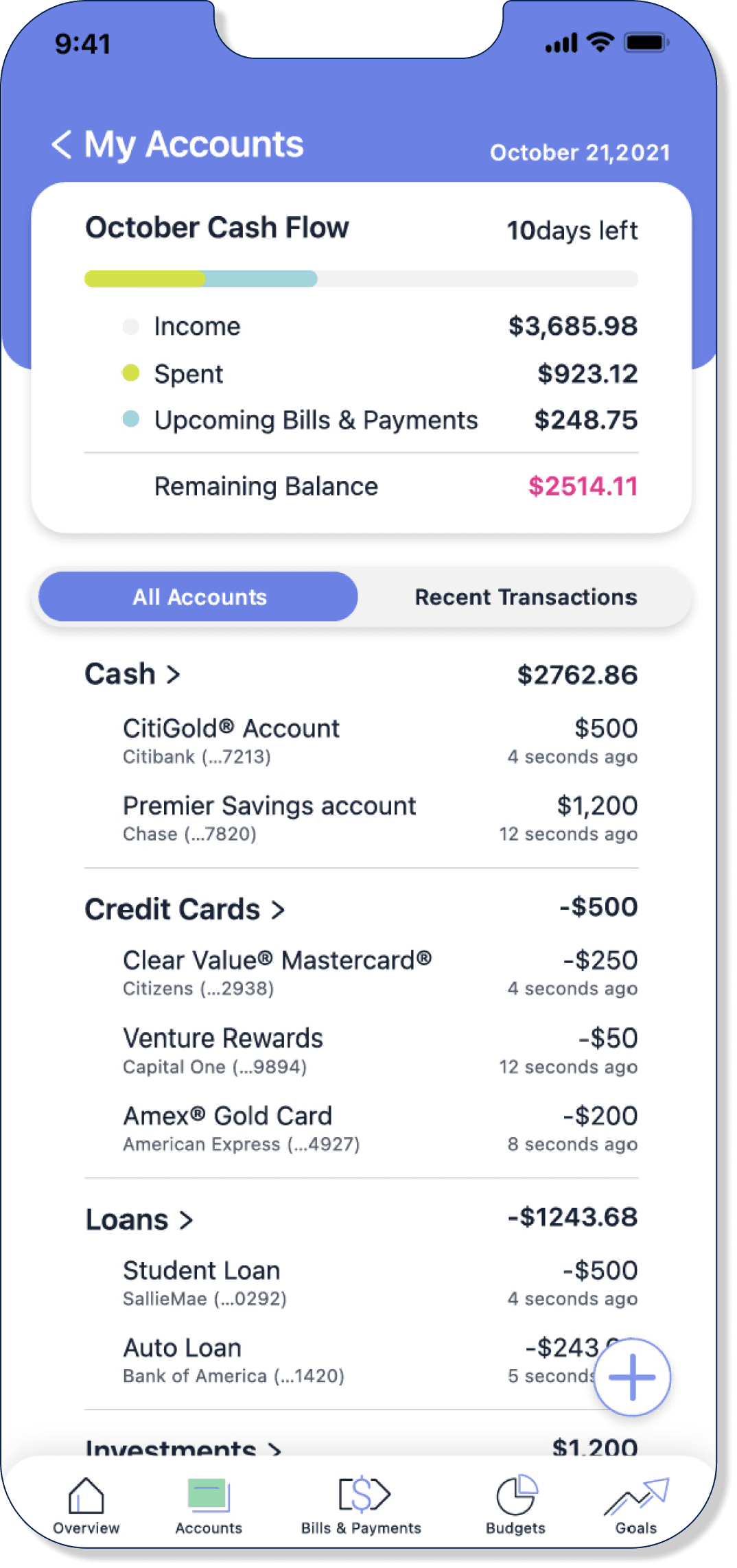
27%
7 out of 26
No logos leave a cleaner interface.
No logos leave a cleaner interface.
A looks simple and less intimidating.
A looks simple and less intimidating.
Adding logos made the page feel cluttered and confusing.
Adding logos made the page feel cluttered and confusing.
B
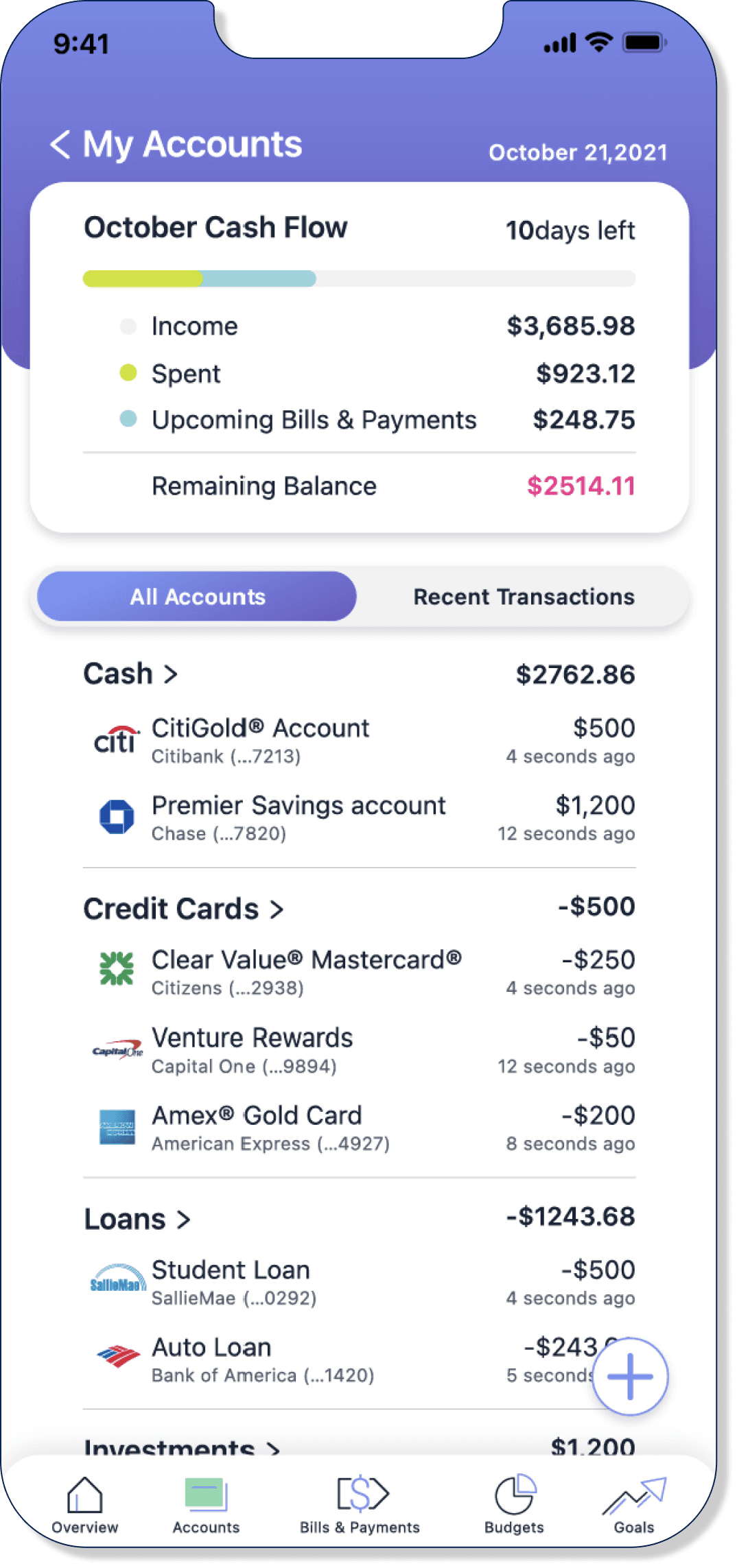
73%
19 out of 26
Having logos makes the experience feel more engaging and enjoyable.
Having logos makes the experience feel more engaging and enjoyable.
The logos next to each account category make an easier scanning.
The logos next to each account category make an easier scanning.
B makes me feel the 'financial app' vibe.
B makes me feel the 'financial app' vibe.
I tested two versions of the experience: A without logos and B with logos. Most users preferred Version B, stating that the logos made the experience more engaging.
Evaluated logo and non-logo designs. The majority preferred the logo version for a better overall app experience.
Design Revisions
Design Revisions
Using insights from usability and preference testing, along with Material Design and WCAG guidelines, I refined the prototype to improve accessibility and overall usability.
Used usability and preference testing results and accessibility guidelines to refine the prototype and improve overall usability.
Previous
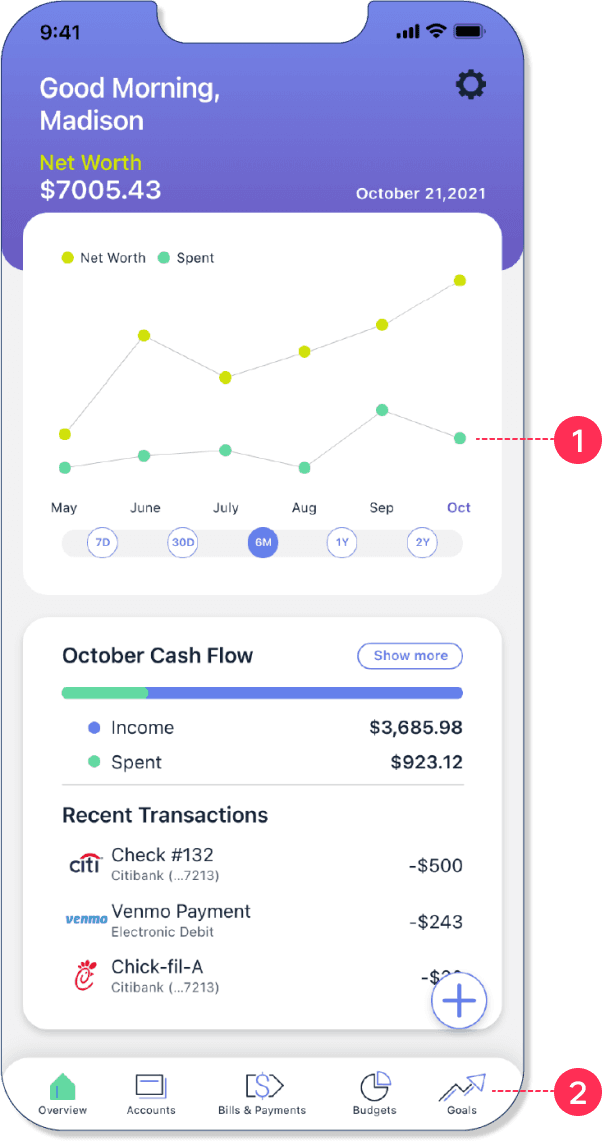
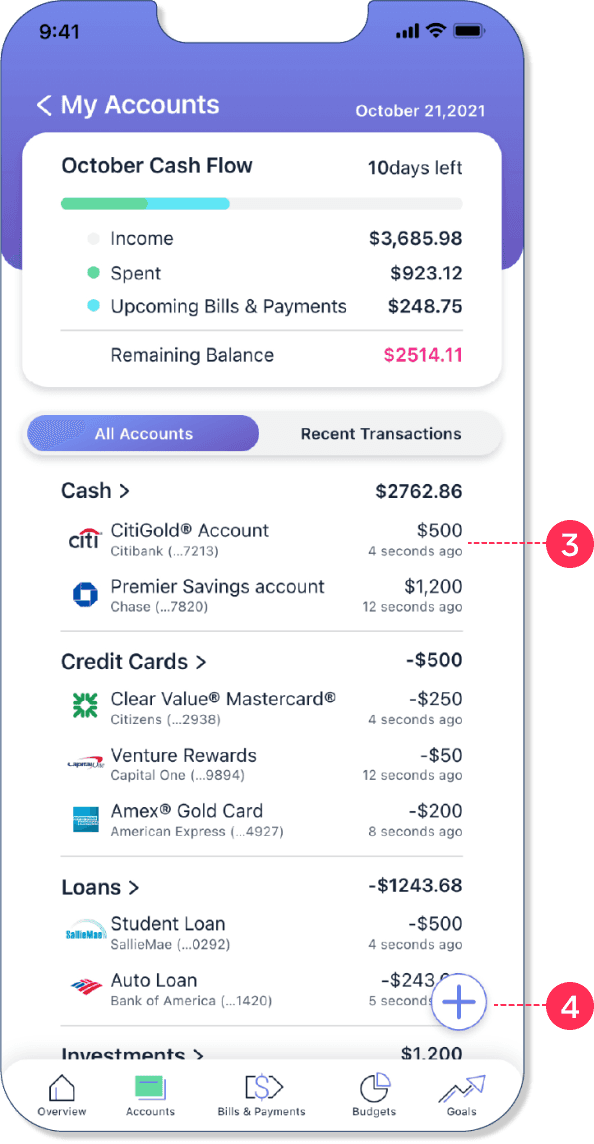
Accessibility & Usability Issues
1
Failed WCAG contrast standards
Failed WCAG contrast standards
2
Thin icons reduced legibility
Thin icons reduced legibility
3
Inconsistent icon sizing impacted visibility
Inconsistent icon sizing impacted visibility
4
CTA button was too small to tap
CTA button was too small to tap
revised
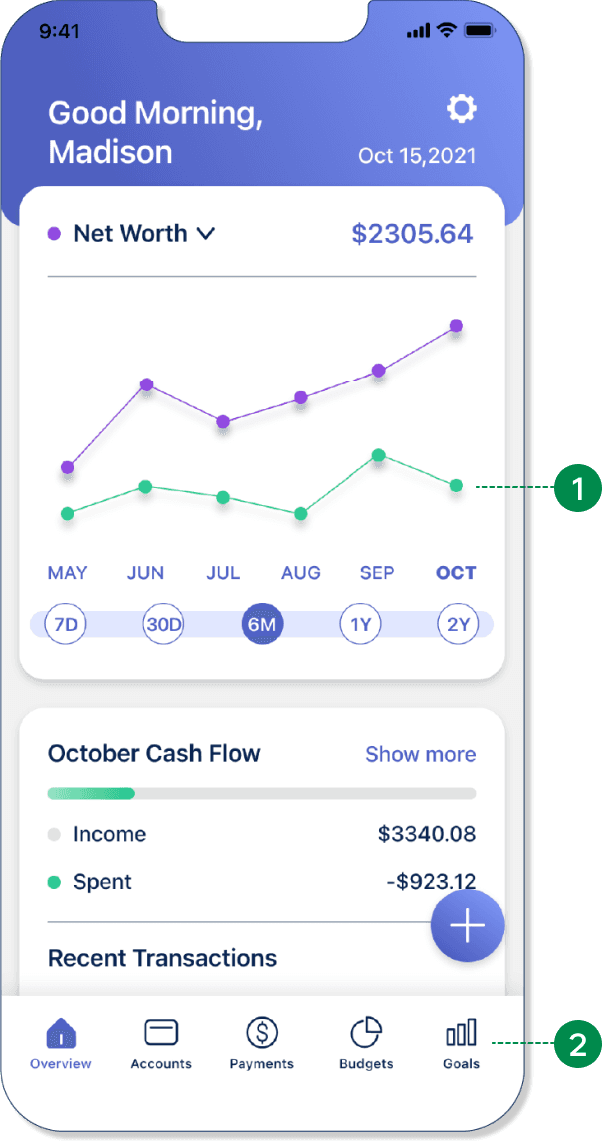
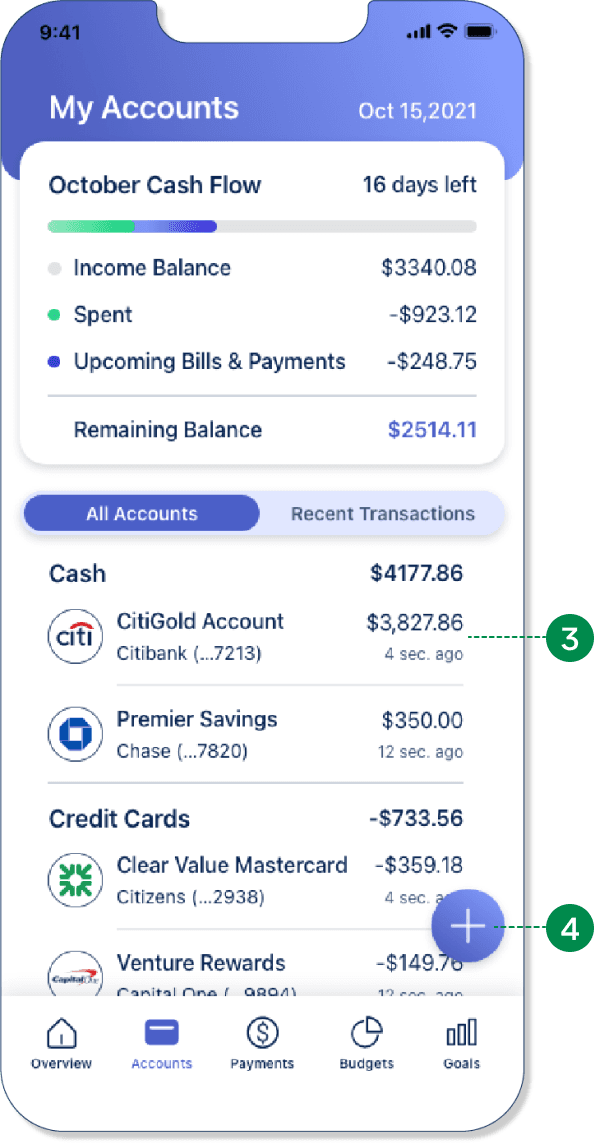
Accessibility Improvements
1
Improved color contrast to meet WCAG standards
Improved color contrast to meet WCAG standards
2
Simplified icons for better clarity
Simplified icons for better clarity
3
Standardized icon sizing and proportions
Standardized icon sizing and proportions
4
Enlarged the CTA button for better accessibility
Enlarged the CTA button for better accessibility
Design Documentation
Below are examples of my design documentation, showcasing the app guidelines, interaction patterns, and design rationale used to create a more engaging and intuitive experience.
color
primary
primary
text, animation, logo, buttons
secondary
text, animation, logo, buttons, graphs, ground
accents
animation, graphs, sliders
Typography
intro page header
page title
page subtitles, logo, dates
page subtitles, logo, dates
page subtitles, card titles
body subtitles, buttons
body text headers, card titles, emphasized text
body text
tab menu buttons
body caption
progress tracker text
UI COMPONENTS
logo
data input field
buttons
primary
secondary
tab menu
FAB
toggle
calendar button
iconography
navigation bar

enabled

pressed
Design Documentation
Design documentation outlining the process and guidelines for a simple, intuitive, and user-friendly app.
color
primary
text, animation, logo, buttons
secondary
text, animation, logo, buttons, graphs, ground
accents
animation, graphs, sliders
Typography
intro page header
page title
page subtitles, logo, dates
page subtitles, logo, dates
page subtitles, card titles
body subtitles, buttons
body text headers, card titles, emphasized text
body text
tab menu buttons
body caption
progress tracker text
UI COMPONENTS
logo
data input field
buttons
primary
secondary
tab menu
FAB
toggle
calendar button
iconography
navigation bar
enabled
pressed
High Fidelity Prototype
High Fidelity Prototype
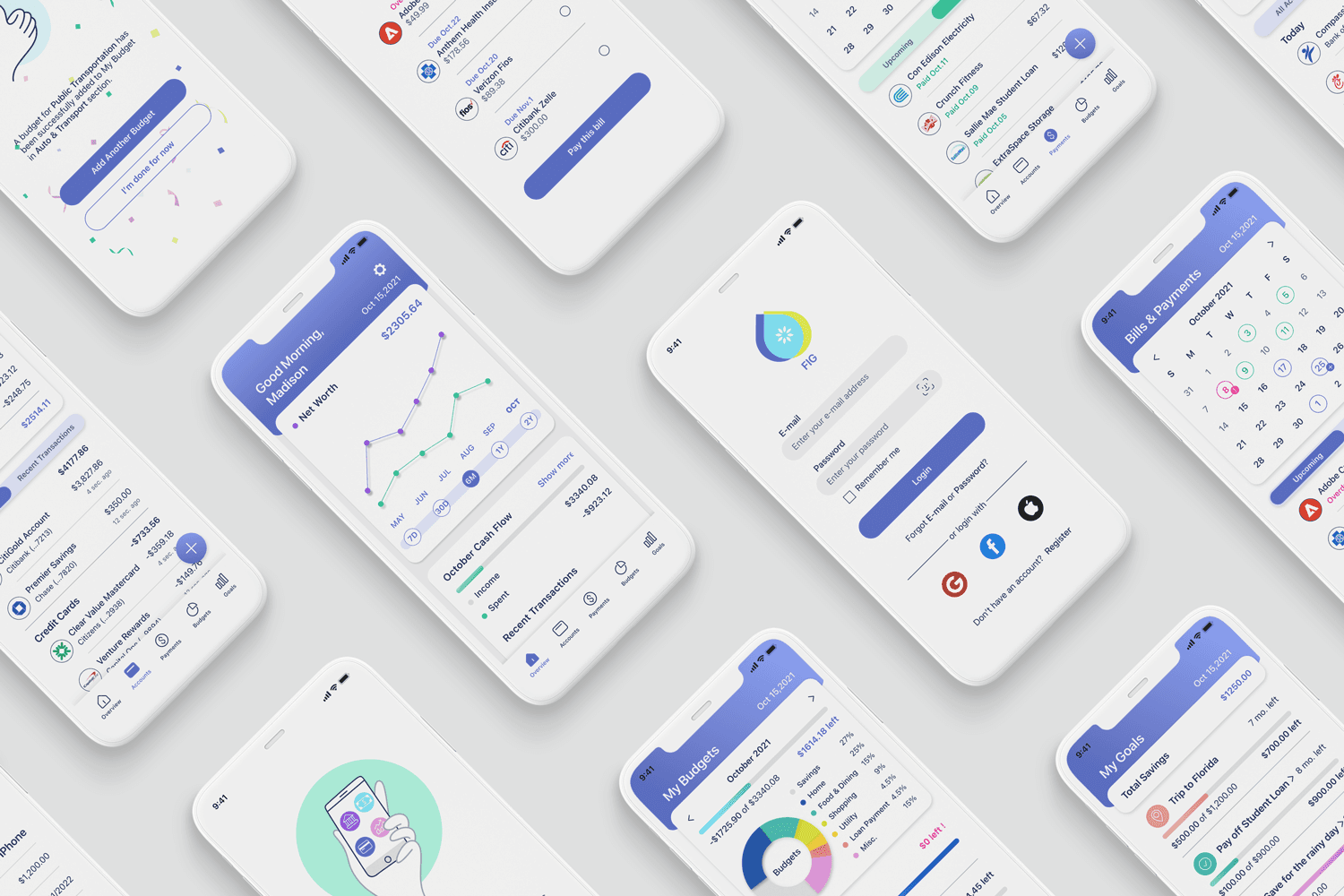
After iterative testing and refinements, I finalized a high-fidelity prototype with clear user flows, intuitive interactions, and simplified navigation focused on usability and visual clarity.
After multiple testing cycles, I completed a high-fidelity prototype focused on clarity, interactivity, and ease of navigation.
Introduction
Uses purposeful animations to create an engaging onboarding experience
Guides users through key features and core app value
Guides users through key features and core app value
Creates an intuitive first-time experience
Introduction
Uses purposeful animations to create an engaging onboarding experience
Guides users through key features and core app value
Creates an intuitive first-time experience
onboarding
Simplifies onboarding with minimal registration requirements
Simplifies onboarding with minimal registration requirements
Enables faster sign-up through social login
Enables faster sign-up through social login
Adds Face ID for secure multi-factor authentication
Adds Face ID for secure multi-factor authentication
Overview
Designs a dashboard overview for cash flow, bills, budgets, and goals
Designs a dashboard overview for cash flow, bills, budgets, and goals
Enables quick access to detailed financial actions and insights
Enables quick access to detailed financial actions and insights
Uses a FAB for fast account linking, payments, and budget or goal creation
Uses a FAB for fast account linking, payments, and budget or goal creation
Accounts
Designs a My Account overview for cash, credit cards, loans, and investments
Designs a My Account overview for cash, credit cards, loans, and investments
Enables users to view individual account activity and recent transactions
Enables users to view individual account activity and recent transactions
Uses a FAB to streamline linking new accounts
Uses a FAB to streamline linking new accounts
Bills & Payments
Designs a Bills & Payments experience with a calendar view of upcoming and paid bills
Designs a Bills & Payments experience with a calendar view of upcoming and paid bills
Enables users to track due dates, payment history, and payments in one place
Enables users to track due dates, payment history, and payments in one place
Budgets
Enables users to track spending and create category-based budgets
Enables users to track spending and create category-based budgets
Provides detailed budget breakdowns for improved financial visibility
Provides detailed budget breakdowns for improved financial visibility
Uses a FAB to quickly create and manage budgets
Uses a FAB to quickly create and manage budgets
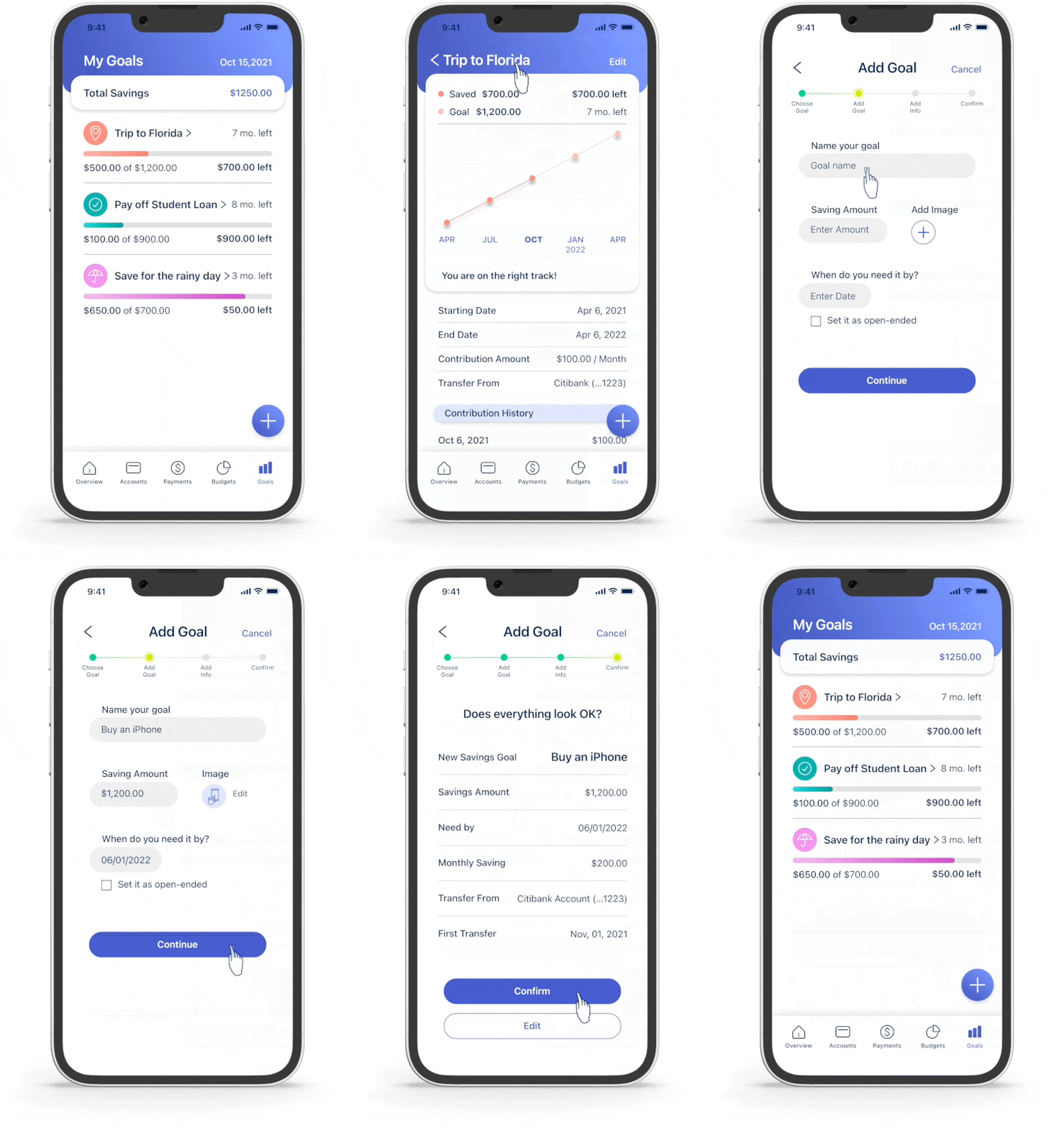
GOALS
Enables users to create and track savings goals with clear progress indicators
Enables users to create and track savings goals with clear progress indicators
Enables users to create and track savings goals with clear progress indicators
Helps users build healthier financial habits through goal tracking
Helps users build healthier financial habits through goal tracking
What I have learned
What I have learned
I gained valuable experience translating research into a high-fidelity prototype and bringing ideas to life through research, user testing, and feedback. Viewing the product from the user’s perspective helped shape a user-first, intuitive experience, and I will continue refining the app based on ongoing user feedback.
This project strengthened my ability to translate research into a high-fidelity, user-first design. Using validated data, I created an intuitive experience and will continue refining the app based on user insights.
Thank you for watching.
Thank you for watching.
Thank you for watching.