HOA Financial Service Platform Modernization
HOA Financial Service Platform Modernization
Revamp the outdated platform to enhance the client experience, driving client retention and revenue growth.
Revamp the outdated platform to enhance the client experience, driving client retention and revenue growth.
Timeline
I Mar 2024 - Jul 2024
Role
I UX designer in Digital Banking team
Timeline
I Mar 2024 - Jul 2024
Role
I UX designer in Digital Banking team
Business Overview
Business Overview
What is SmartStreet (HOA Financial Service platform)?
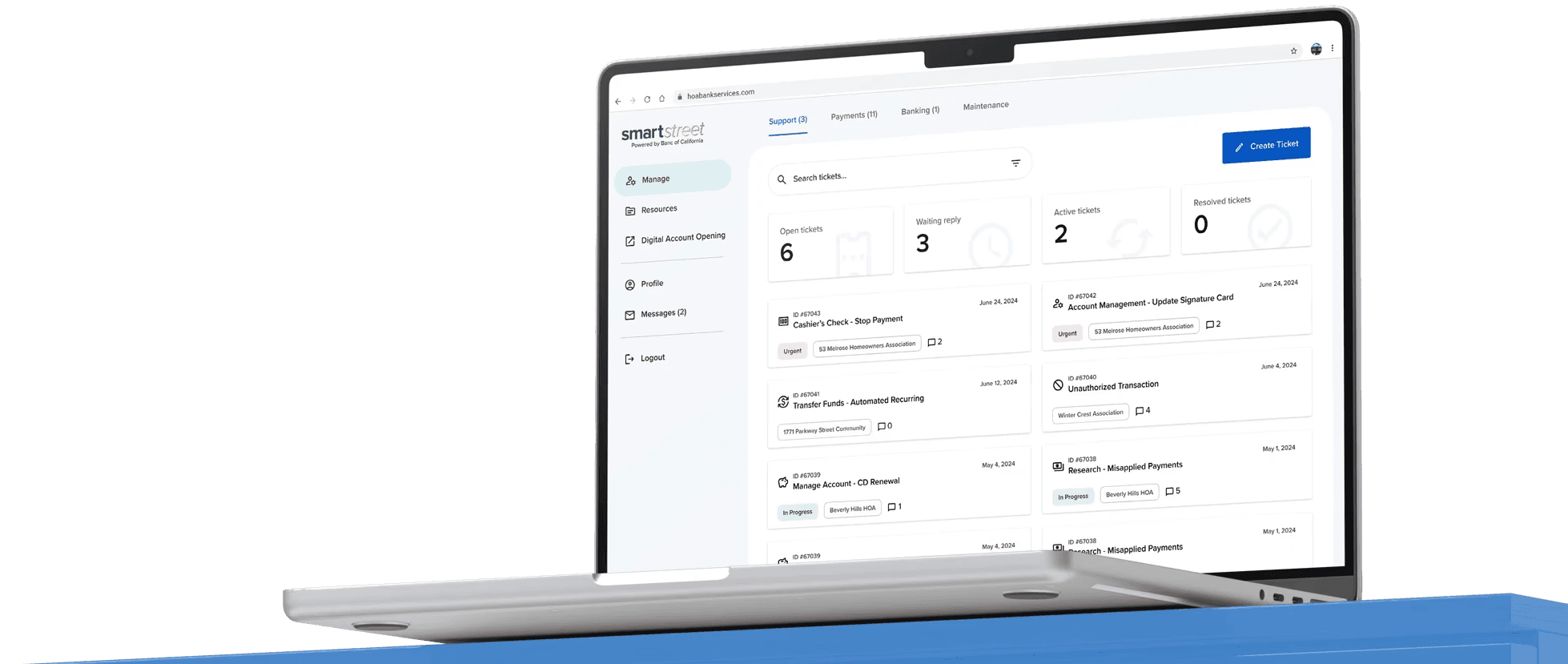
SmartStreet is a SaaS platform used by HOA property management companies to manage HOA finances, including payments, deposits, and property management.
A SaaS platform for HOA property management companies to manage finance-related workflows.
Banc of California profits from the deposit balances, payment processing fees,
and lending to the property management companies utilizing SmartStreet.
Revenue is driven by deposit balances, payment processing fees, and lending to property management companies on SmartStreet.
Banc of California profits from the deposit balances, payment processing fees, and lending to the property management companies utilizing SmartStreet.
SmartStreet Statistics
SmartStreet Statistics
439
439
Property Management Companies
Property Management Companies
38,014
38,014
HOA (Home Owners Association)
HOA (Home Owners Association)
$4,130,982,520
Total Deposit
$4,130,982,520
Total Deposit
challenges
top revenue
The HOA Property Management platform is BOC's top revenue-grossing product, generating $300 million annually.
BOC's top revenue-grossing product, generating $300 million annually.
poor usability
Initially developed by developers 15 years ago, the outdated platform lacks coherence and hinders user experience.
Initially developed by devs 15 years ago, the outdated platform lacks coherence and hinders UX.
Business Objective
Business Objective
Revamp the current HOA Property Management platform aiming for:
Revamp the current HOA Property Management platform aiming for:
25%
25%
↑ Increase in user satisfaction scores within 12–24 months
user satisfaction scores ↑ within 12–24 months of modernization
20%
20%
↑ Increase in
new client sign-ups within 12 months
new client sign-ups ↑
35%
35%
↑ Increase in deposit accounts within 12 months
deposit accounts ↑ within 12 months of the platform's modernization
Projected goals based on market analysis and estimated business impact.
Research & Discovery
Research & Discovery
Current State Analysis IA
objective
Analyze and understand the current platform for enhancement.
activity
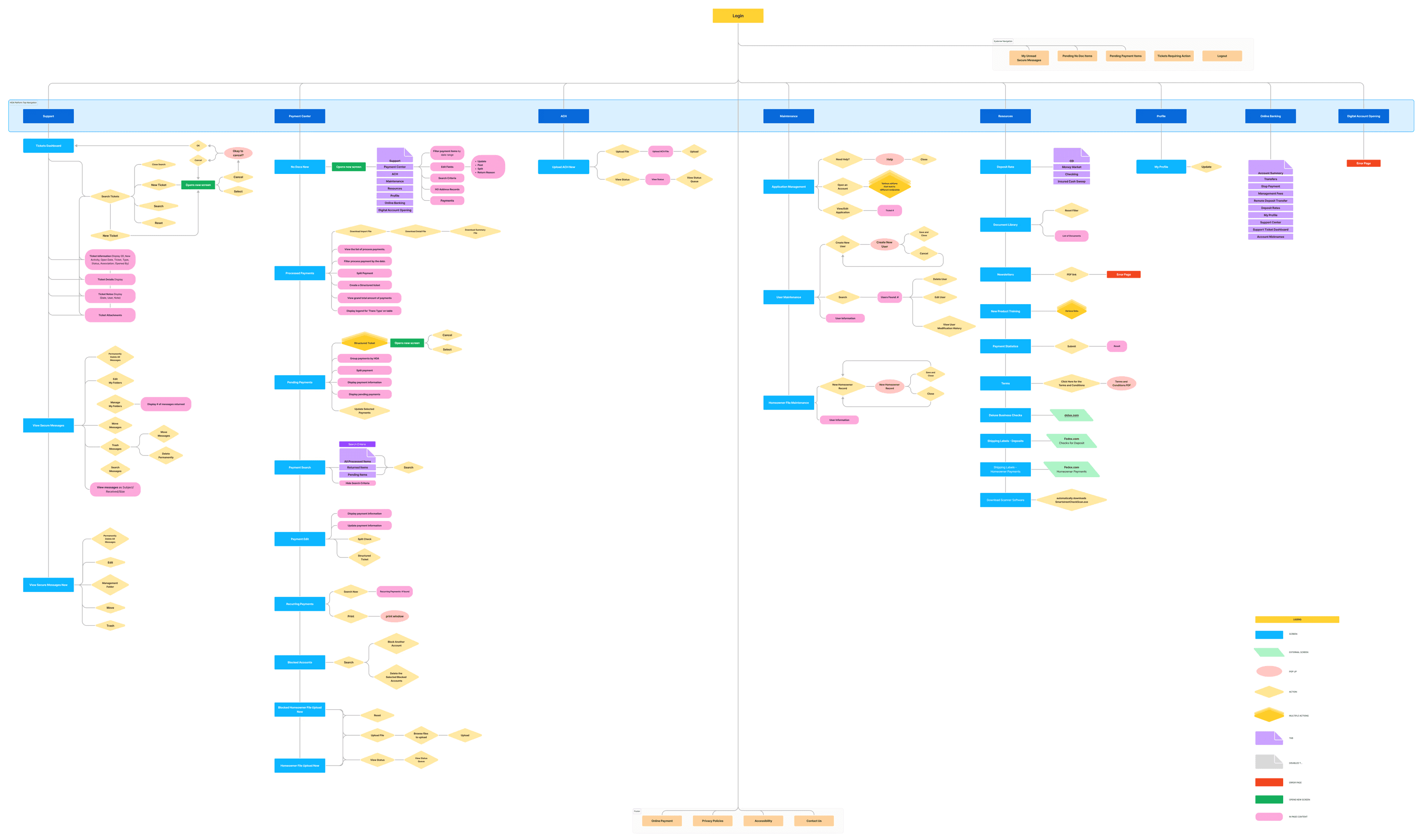
Create and document the platform’s top-down information architecture based on observations.
documented the platform’s information architecture using a top-down approach grounded in observation.
finding
The current IA is highly complex due to many interconnected gateways.
current IA extends far beyond what is documented, with many interconnected gateways contributing to complexity.
User Interviews
Six interviews were conducted across four roles, gathering 97 pieces of qualitative and quantitative data. Common feedback patterns were identified and rated based on the severity of the issue.
Conducted six interviews across four roles, synthesizing 97 qualitative and quantitative data points into severity-ranked insights.
objective
Identify the users' pain points to define the correct UX opportunities to improve the platform.
Scoop
Interviews with internal users were conducted via Teams for 30–45 minutes, focusing on portal usage and daily feedback.
conducted 30–45 minute Teams interviews to understand portal experience and the feedback received in daily operations.
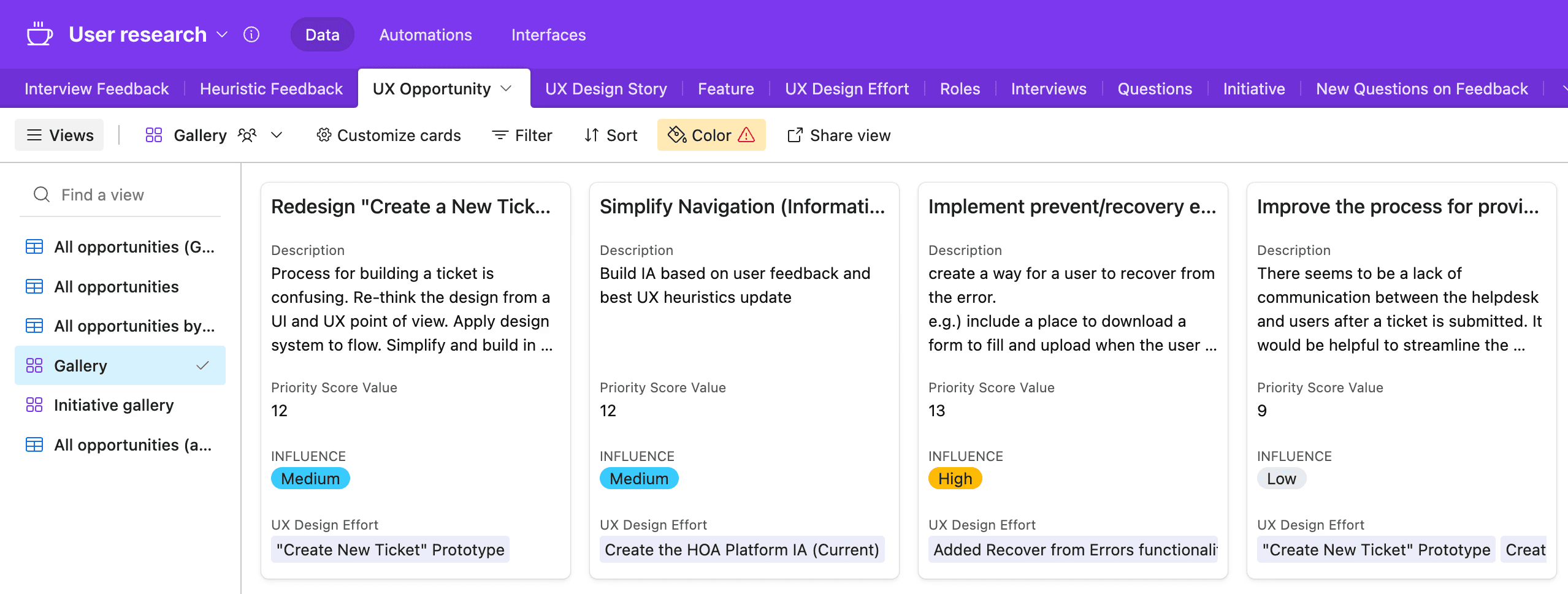
All user feedback is documented in Airtable for optimal organization and viewing.
All user feedback is documented in Airtable for optimal organization and viewing.
Heuristic Evaluation
All user feedback was evaluated according to Jakob Nielsen’s 10 usability heuristics, and the problems were identified based on this evaluation.
All feedback was evaluated using Jakob Nielsen’s 10 usability heuristics to identify and categorize usability issues.
An example of the process for identifying problems with the current portal.
an example of the process for identifying problems with the current portal.
01.
Interview Feedback
Based on these interview feedback:
Navigation feels aligned, but occasional issues arise, prompting suggestions to use alternative routes or storytelling to locate desired features
Navigation is largely intuitive, but inconsistencies lead to seek alternative routes to reach desired features.
If someone is very frustrated, I suggest they choose 'other' and write what they need. We'll read it and follow up from there
If users feel frustrated, they can select “Other” and describe their issue, and we will review it and follow up.
Users face challenges in creating tickets, particularly in understanding the issue and selecting the appropriate ticket type
Users struggle to create tickets, particularly when identifying the issue and selecting the correct ticket type.
02.
Evaluation
The evaluation determined that it does not meet the UX principle of Flexibility and Efficiency of Use, leading to the identification of a problem.
Determined that it does not meet the UX principle of Flexibility and Efficiency of Use, identifying it as a usability issue.
03.
Define Problem
Identifying the correct ticket type per use case is challenging.
04.
Rating
The problem was rated based on heuristic importance and user impact.
The problem was rated based on heuristic importance and user impact.
heuristic importance
how significantly the problem affects the overall user experience of the platform.
how significantly the problem affects the overall user experience of the platform.
user impact
how the problem affects the user's ability to complete their task.
how the problem affects the user's ability to complete their task.
05.
Define UX Opportunities
These ratings were later combined to determine the priority and severity of UX opportunities.
These ratings were later combined to determine the priority and severity of UX opportunities.
examples of problems identified
examples of problems identified
Visibility of System Status
Difficult to identify the primary action across the application.
Difficult to identify the primary action across the application.
heuristic importance
user impact
Aesthetic and Minimalist Design
UI design not aligning with the Aurum design system.
UI design not aligning with the Aurum design system.
User Control and Freedom
Users can't delete or cancel a submitted ticket.
Users can't delete or cancel a submitted ticket.
Error Prevention
The lack of error recovery functionality in the Ticketing System.
The lack of error recovery functionality in the Ticketing System.
Help and Documentation
No confirmation of receipt or updates on ticket progress on a submitted ticket.
No confirmation of receipt or updates on ticket progress on a submitted ticket.
Recognition Rather than Recall
User must rely on their historical knowledge of the platform to navigate it correctly
User must rely on their historical knowledge of the platform to navigate it correctly
Initiatives Identified
User feedback patterns were categorized into 10 major initiatives to better define areas of prioritization.
User feedback patterns were grouped into 10 key initiatives to clarify and prioritize focus areas.
Product Initiative
Examples of user feedback
Current State/First Impression
Current State/First Impression
"Right now, we have about 600-700 clients using the portal."
"Right now, we have about 600-700 clients using the portal."
Banking Service
Banking Service
"Some software companies charge hefty ACH setup fees, sometimes around $15 per transaction."
"Some software companies charge high ACH setup fees, sometimes up to $15 per transaction."
Integration
Integration
"Portal does not integrate well with IBS, leading to discrepancies in account balances and issues with ICS."
"The portal’s poor integration with IBS leads to account balance discrepancies and ICS issues."
User Provisioning
"Our analyst team supports several Tier 1 clients, our largest clients with the highest deposits."
"We have a group of analysts who support several Tier 1 clients—our largest customers with the highest deposits."
System Usability
"Desired improvements include better attachments, clearer customer visibility, and a simpler process for staff and clients."
"Desired improvements include improved attachments, clearer customer visibility, and a simpler experience for both staff and clients."
Payments
"A misapplied payment occurs when a homeowner makes a payment in the portal but selects the wrong association."
Ticketing
"We're averaging somewhere around 100 to 150 support tickets a day."
UX Opportunities Identified
After scoring the problems and identifying initiatives, 24 UX opportunities for improvement were created. Each opportunity was rated for user impact and design effort, with the ratings combined to calculate an overall influence score.
After scoring the problems, 24 UX improvement opportunities were identified and prioritized.
Here is an example of how we identified the UX Opportunity
here is an example of how we identified the UX Opportunity
01.
Identified Problem
The lack of error recovery functionality in the Ticketing System.
The ticketing system lacks error recovery functionality.
Excessive and redundant steps and clicks when creating a ticket.
Excessive and redundant steps and clicks when creating a ticket.
Navigation to different menus when creating a ticket is inconsistent, and the directions for user actions are unclear.
Ticket creation navigation is inconsistent, and user action guidance is unclear.
02.
Define a UX opportunity to address identified problems
Redesign "Create a New Ticket" Process
Redesign "Create a New Ticket" Process
Revise the ticket creation process from a UX perspective, applying a design system to simplify the flow and improve user communication regarding progress.
Redesign the ticket creation flow using the design system to simplify the experience and clearly communicate user progress.
The ratings from each UX opportunity are combined to assess their impact on the current portal, from critical to low, and to prioritize actionable items for the first release.
Combined UX ratings assess portal impact and prioritize items for the first release.
Top Initiative Identified
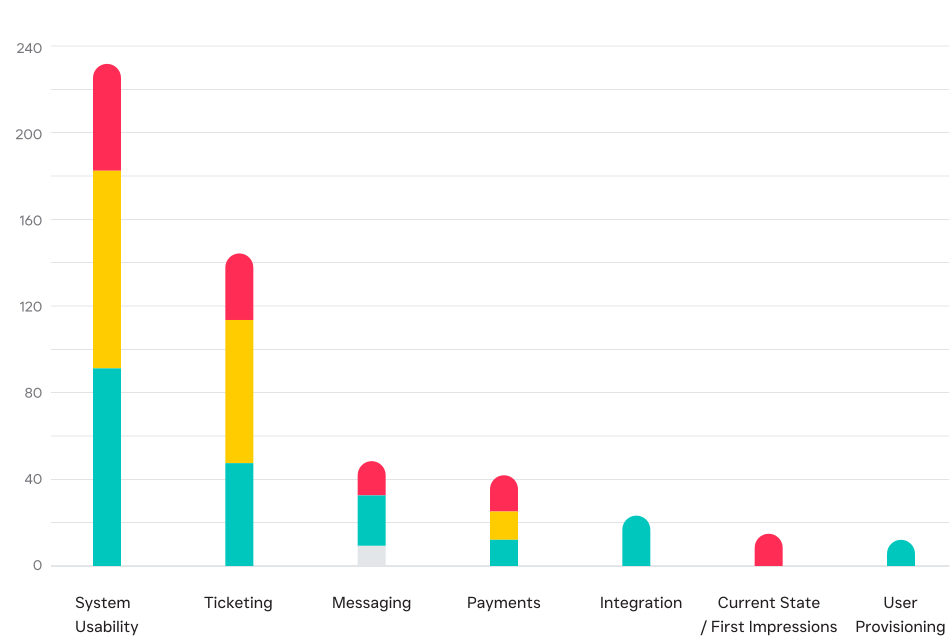
Based on the priority influence rating of each UX opportunity, the top initiatives have been identified for prioritization in the first product release.
Top initiatives for the first release were selected based on UX priority influence ratings.
Product Initiatives by Influence
Product Initiatives by Influence
Influence
Critical
Critical
High
High
Medium
Medium
Low
Low
Overview
Feedback, Opportunities & Initiatives
6
Interviews across four roles
Interviews across four roles
Client Services
Sales/Account Executive
Exception Fraud
Account Servicing
97
Pieces of qualitative and quantitative data
Pieces of qualitative and quantitative data
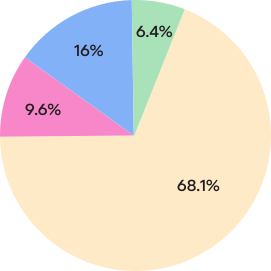
Feedback Amount by Interviewee’s Role
Feedback Amount by Interviewee’s Role
Interviewee’s role/team
Client Services
Sales/Account Executive
Exception/Fraud
Account Servicing
24
UX design opportunities were created then rated on areas of estimated user impact and level of design effort.
UX opportunities were identified and rated by user impact and design effort.

8
Initiatives
Current State/First Impression
Banking Service
Integration
User Provisioning
System Usability
Payments
Ticketing
Top 2 Product Initiatives to Focus on for the First Release
System Usability
Implement platform-wide usability improvements guided by UX heuristic principles and portal evaluations.
Implement platform-wide usability improvements based on UX heuristic evaluations of the portal.
Support Ticketing Enhancements
Support Ticketing Enhancements
Improve the end-to-end support ticketing experience, from ticket creation and management to ticket detail views.
Improve the end-to-end support ticketing experience.
Wireframe
Wireframe
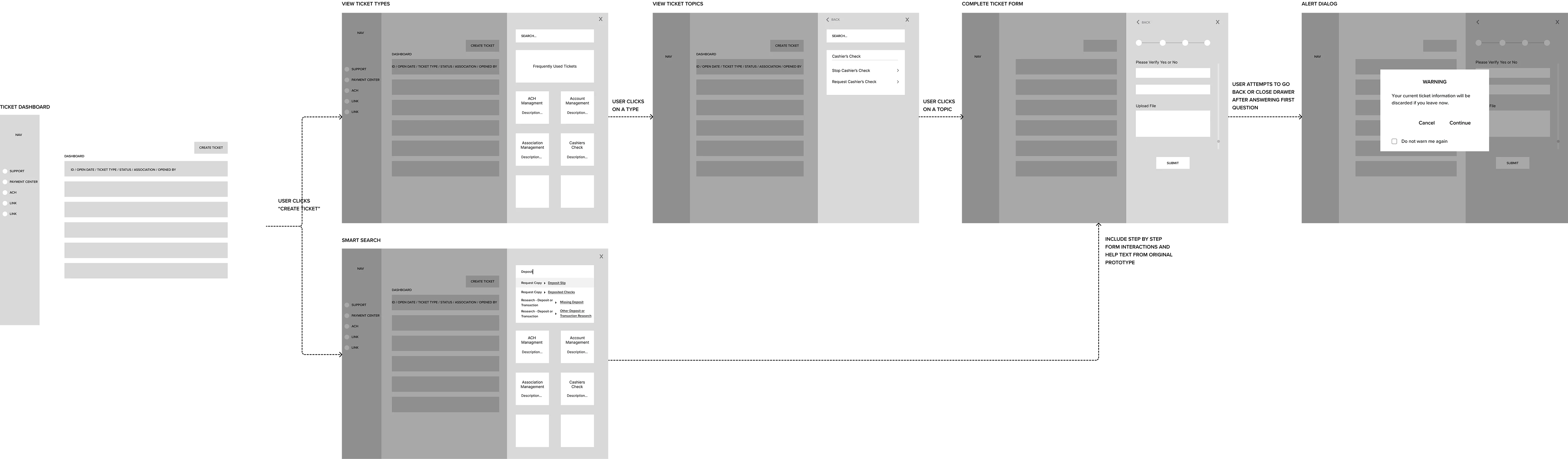
Based on key product initiatives identified during discovery, wireframes were created to validate navigation, ticket discovery, and submission flows before moving into high-fidelity designs.
After scoring the problems, 24 UX improvement opportunities were identified and prioritized.
UX Audit & Redesign
UX Audit & Redesign
Building on the wireframes, a heuristic evaluation of the existing experience was conducted to identify navigation, information architecture, and usability issues impacting ticket discovery and task completion, helping refine the redesign direction.
Building on the wireframes, a heuristic evaluation identified navigation, IA, and usability issues impacting ticket discovery and task completion.
Current State Analysis - Dashboard
It's [using the platform] is about knowing where to go and it's a process because it's a lot of data that's in here based on what you're looking for within the platform.
Using the platform requires knowing where to go due to the volume of data.
— Client services team member
Current
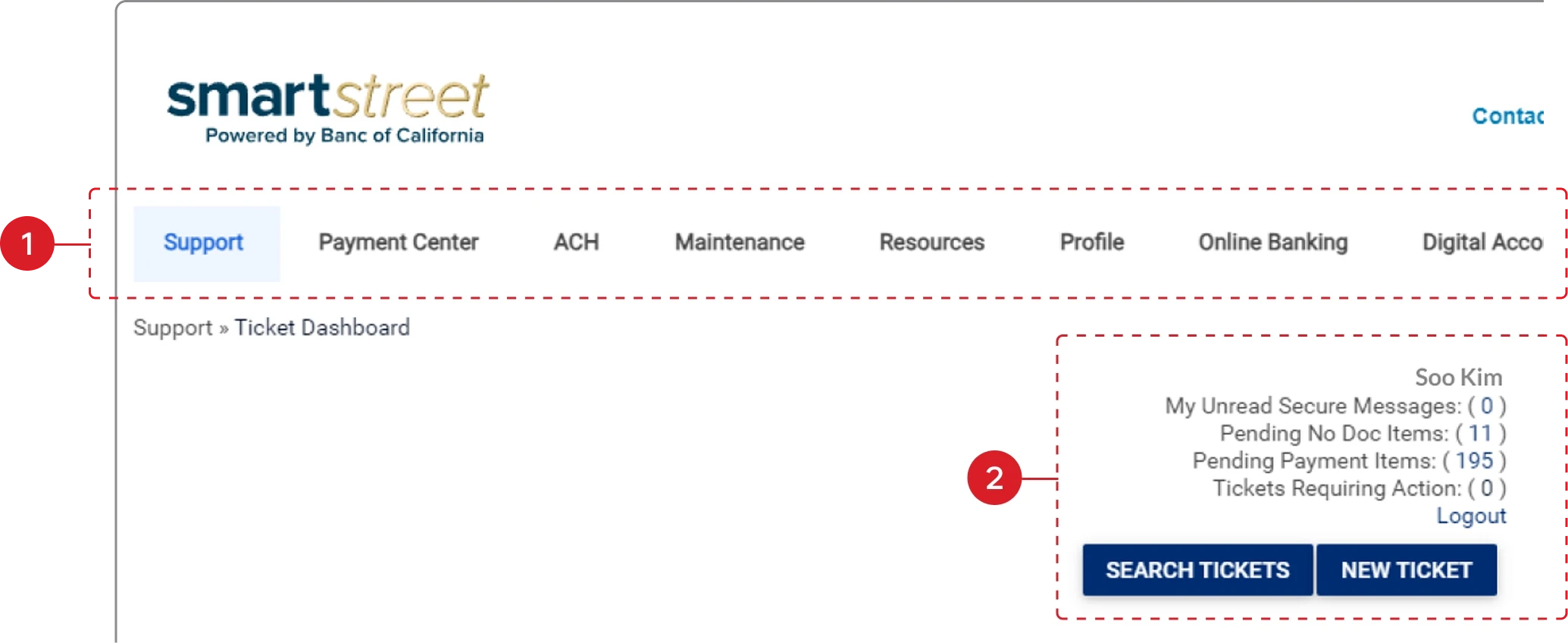
1
Inefficient Navigation
Complex top navigation and nested menus slow task completion.
A complex top menu with multiple submenus hampers users’ ability to select the right options efficiently.
2
Low Visibility of System Status
Important ticket updates and actions are difficult to scan quickly.
Important ticket updates and actions are difficult to scan quickly.
Redesign
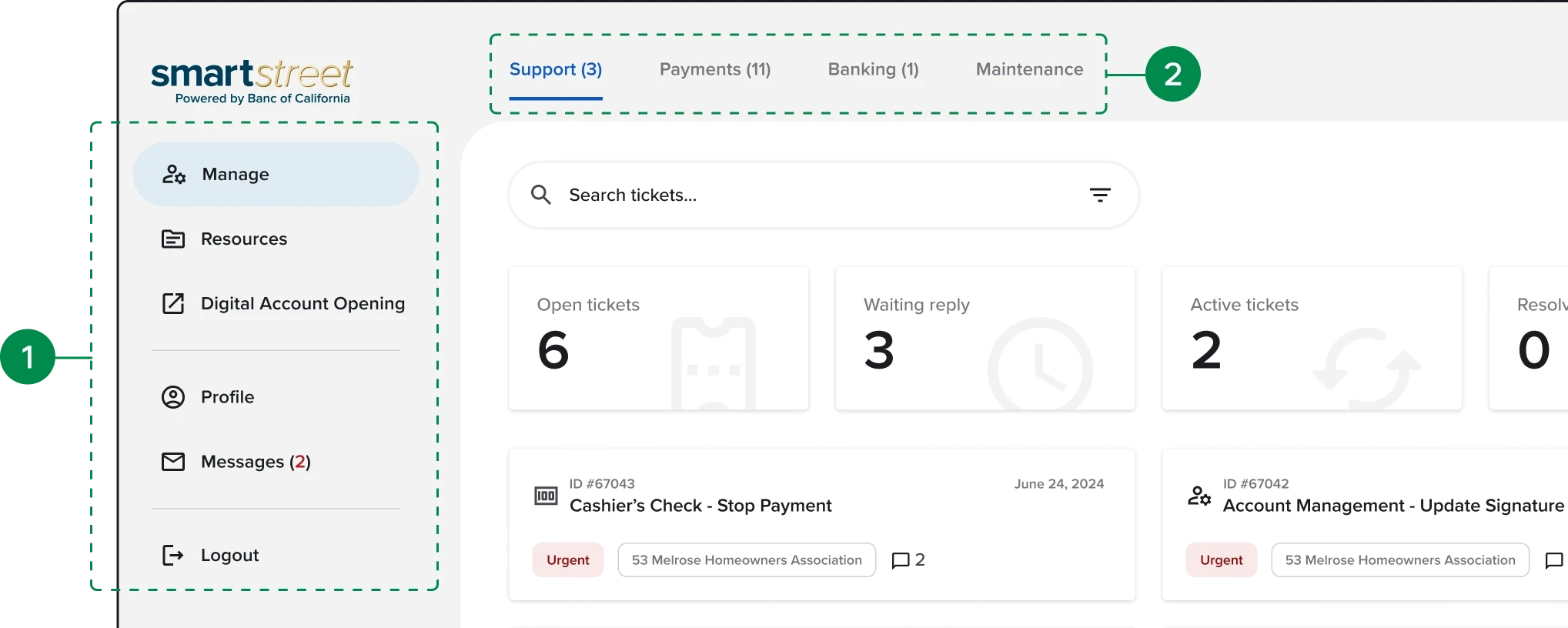
1
Improved Navigation Efficiency
Introduced side navigation and a single-pane layout to streamline navigation.
Single-pane dashboard with side nav. to improve findability, navigation, and scalability.
2
Improved Visibility of System Status
Added contextual tabs and status indicators to improve ticket visibility.
Top tabs aligned with the selected side navigation, using numbered indicators to clearly communicate required actions.
Current State Analysis - Ticket Details
We manage 9-15 tickets daily and spend 2 to 3 hours on average handling a single phone call.
— Client services team member
Current
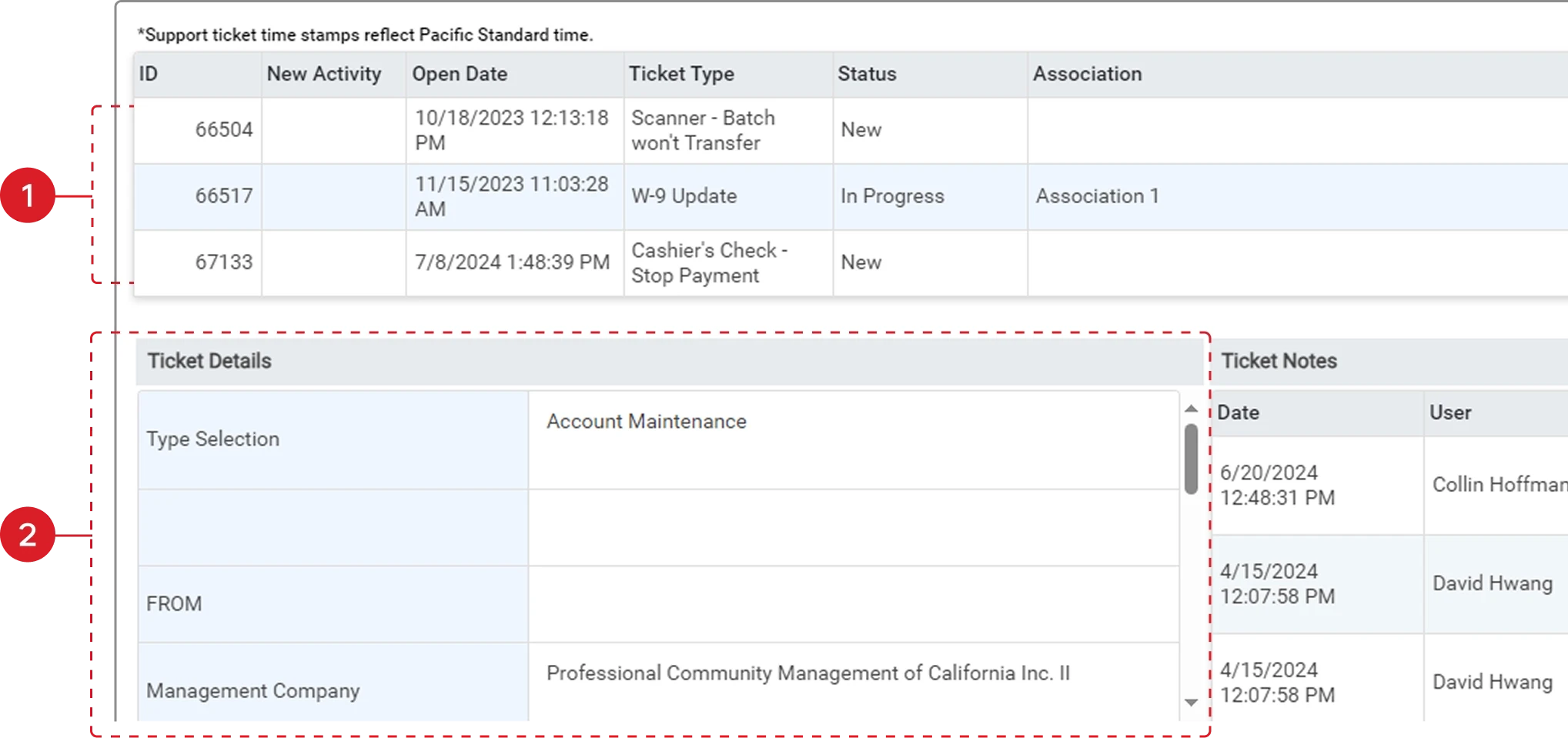
1
Limited Discoverability
Users lacked clear cues for accessing ticket details.
There is no clear indicator to view ticket details, requiring users to rely on prior knowledge to click the row.
2
Low Visibility of System Status
Ticket details and status information were difficult to scan efficiently.
Selecting a ticket shows details below with poor hierarchy, requiring scrolling and reducing readability.
Redesign
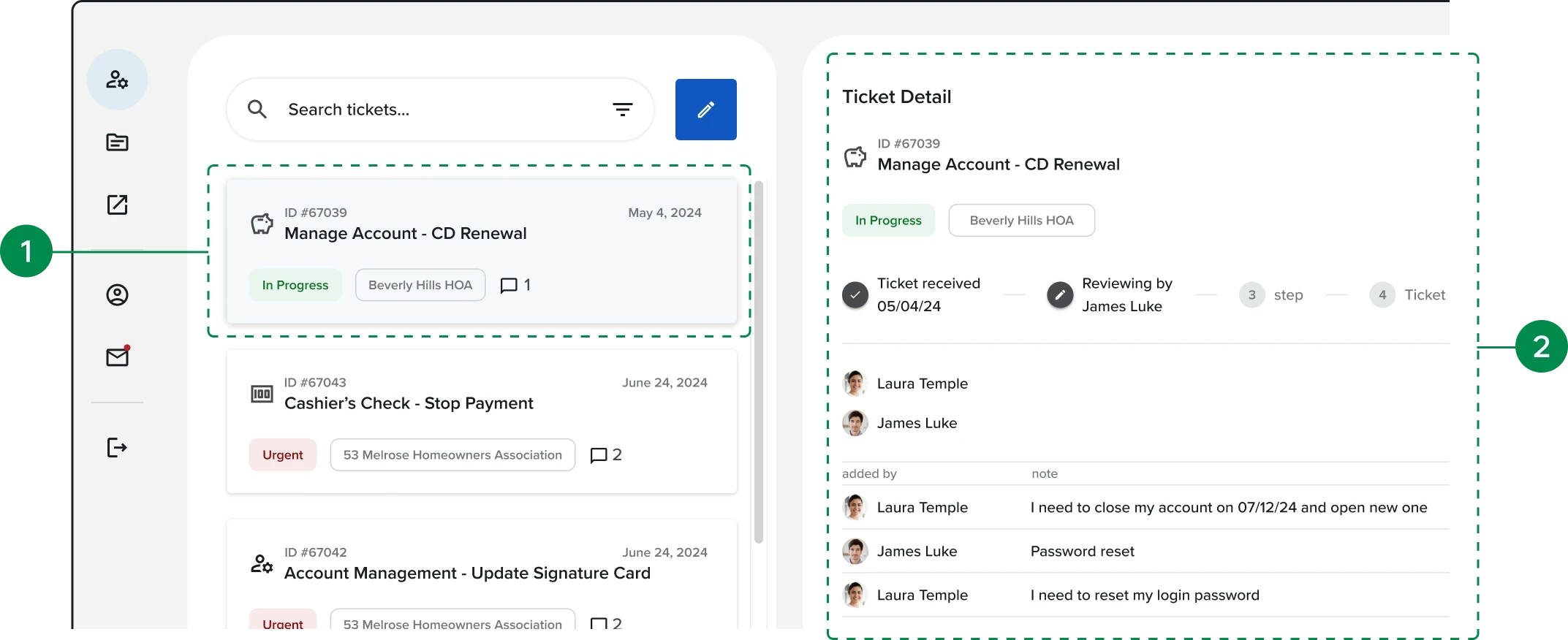
1
Improved Visibility of System Status
Added a sliding detail card to improve visibility of ticket status and communication.
Clicking a ticket card opens a detail pane with status, assignee, and communication.
2
Improved Match Between the System and the Real World
Connected selected ticket cards to the detail panel to create a clearer interaction flow.
The selected ticket card moves to the top to connect with the detail pane, and users can switch between cards to view details.
Current State Analysis - Ticket creation
Current State Analysis - Ticket creation
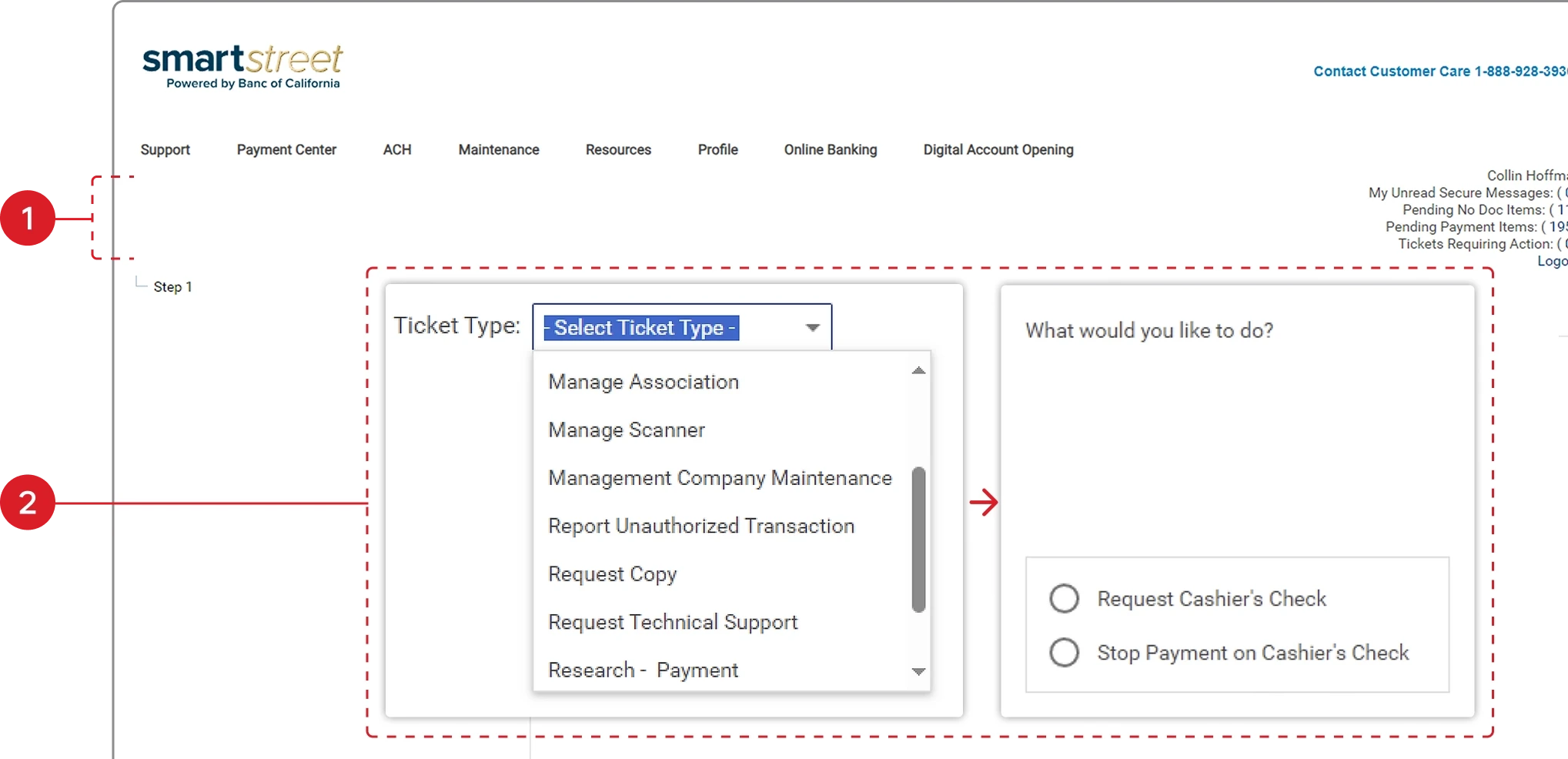
Users face challenges in creating tickets, particularly in understanding the issue and selecting the appropriate ticket type.
Users struggle to create tickets, especially when identifying the issue and selecting the correct ticket type.
— Exception/fraud team member
Current
1
Limited Ticket Status Visibility
Users could not easily view or track current ticket status.
Navigating 12 ticket types and 40 topics slows submission and drives ticket abandonment.
2
Inefficient and Complex Navigation
Users must navigate 12 ticket types and 40 topics, slowing submission, hurting findability, and leading to ticket abandonment.
Navigating 12 ticket types and 40 topics slows submission and drives ticket abandonment.
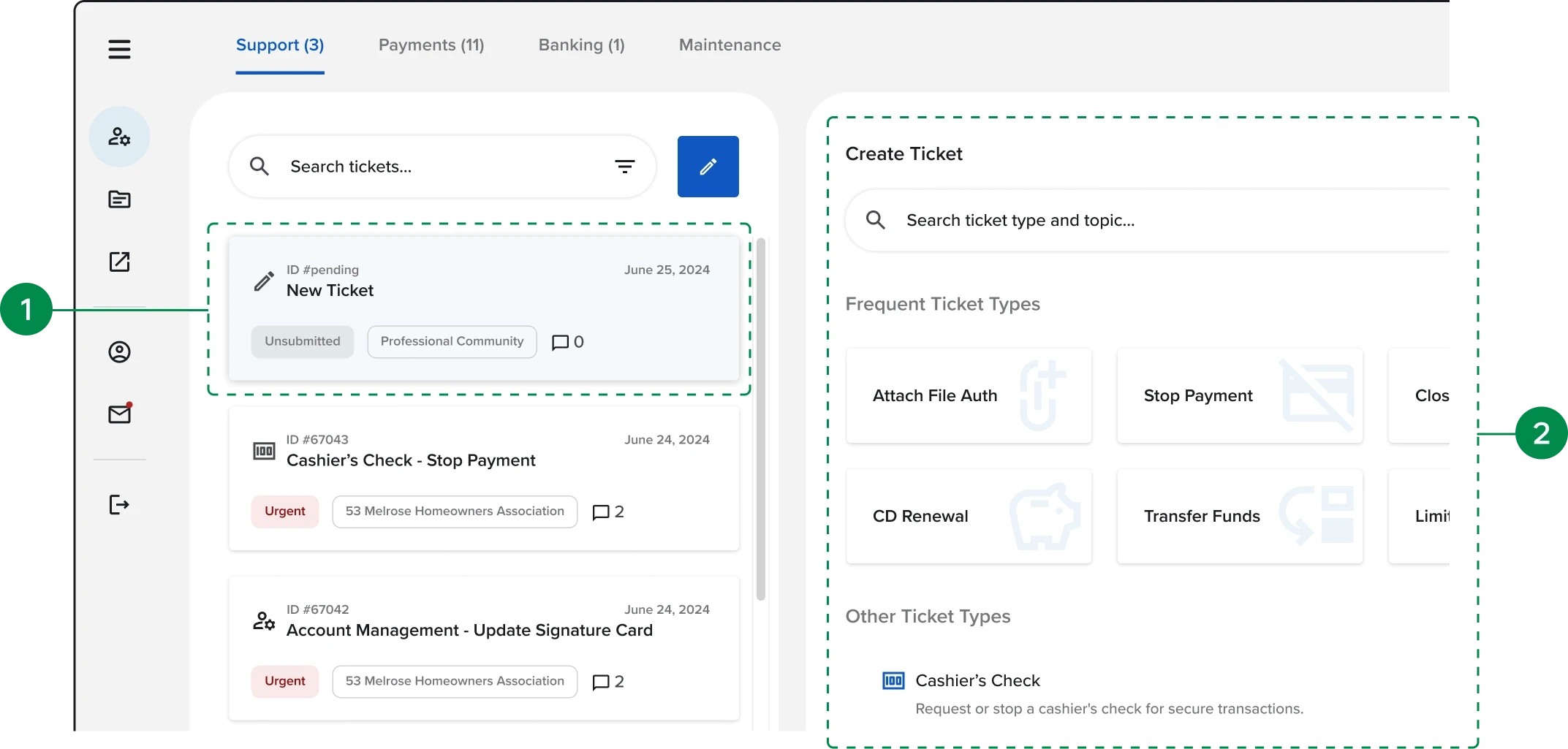
Redesign
1
Improved Ticket Status Visibility
Introduced status cards to provide clear, real-time ticket visibility.
Starting ticket creation shows a placeholder at the top to indicate the current state and maintain consistency.
2
Simplified Ticket Discovery and Submission
Added integrated search, common actions, and progressive disclosure to improve findability and reduce navigation complexity.
Added a search bar and prioritized common ticket types to speed up ticket creation.
Redesigned Experience
Redesigned Experience
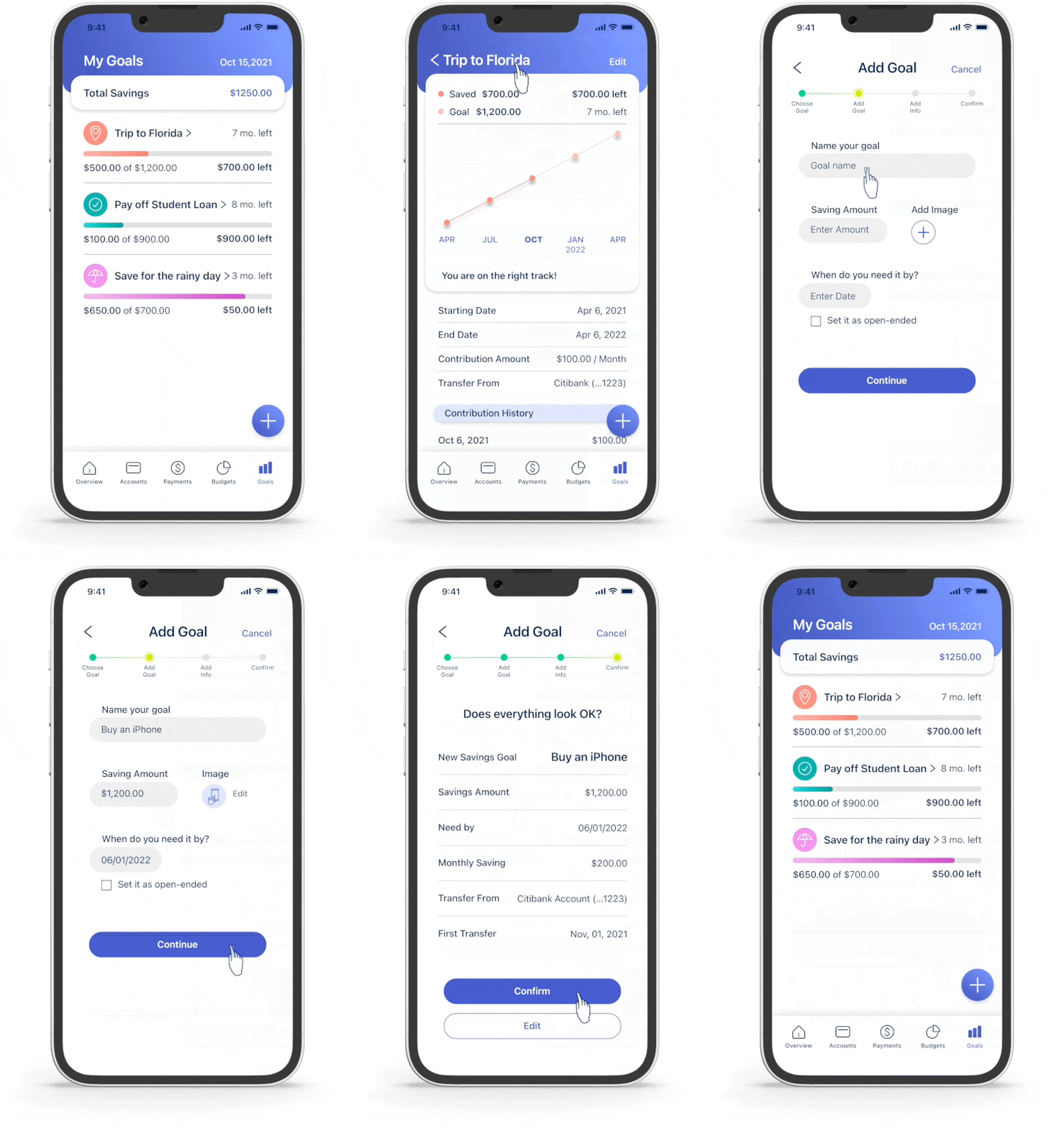
Based on UX audit insights and workflow analysis, the redesigned experience improved discoverability, simplified navigation, and streamlined HOA servicing workflows through a cleaner, more scalable platform.
After scoring the problems, 24 UX improvement opportunities were identified and prioritized.
Outcomes & Impacts
Outcomes & Impacts
The modernization effort transformed a legacy servicing platform into a more scalable, streamlined, and operationally efficient experience.
After scoring the problems, 24 UX improvement opportunities were identified and prioritized.
operational impacts
Simplified navigation across core workflows
Simplified navigation across core workflows
Improved discoverability across financial servicing workflows
Improved discoverability across financial servicing workflows
Reduced workflow fragmentation
Reduced workflow fragmentation
Established scalable UX patterns and foundations
Established scalable UX patterns and foundations
business outcomes
business outcomes
↑25% client sign-ups post launch
↑25% client sign-ups post launch
↑20% deposit revenue increase
↑20% deposit revenue increase
Supported long-term operational scalability
Supported long-term operational scalability
Thank you for watching.
Thank you for watching.
Thank you for watching.